Reconcile Course Section Seats
Overview
The Reconcile Course Section Seats utility, available in the Systems hub, compares the enrollees in a Course Section List against the number actually enrolled in Student Courses. If the counts are different, the Section List is updated with the count from Student Courses. The waitlisted numbers are also reviewed and updated, if necessary.
Initial Run
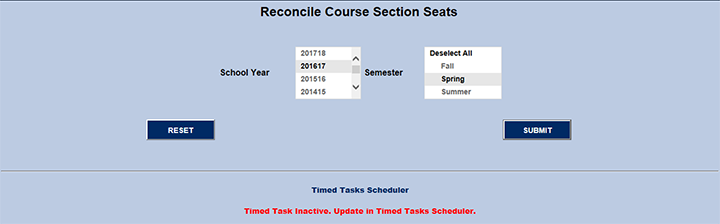
The first time this function is used, the page looks like the image below. There is a multi-select School Year drop and a multi-select Semester drop. The default uses the System Variables values for the current school year and semester.
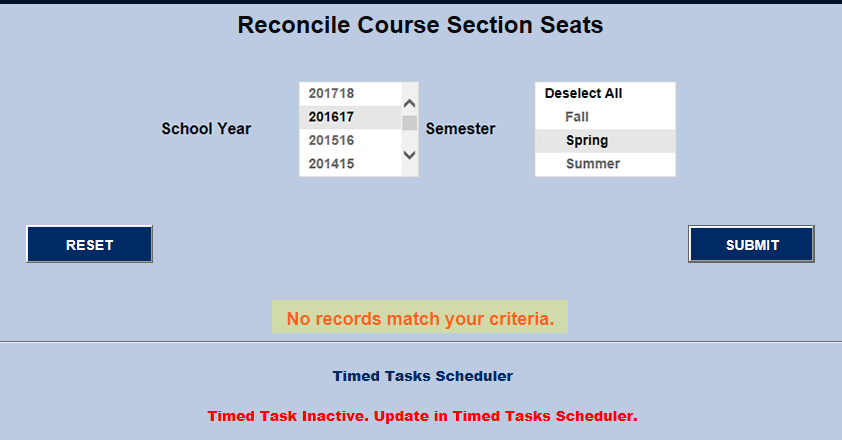
At the bottom of the page is an alert in red: Timed Task Inactive. Update in Timed Task Scheduler. This alert is to remind users to activate the Reconcile Course Section Seats Timed Task Scheduler if their intention is to automatically reconcile course section seats at a specific time and/or interval.
Activating the Timed Task
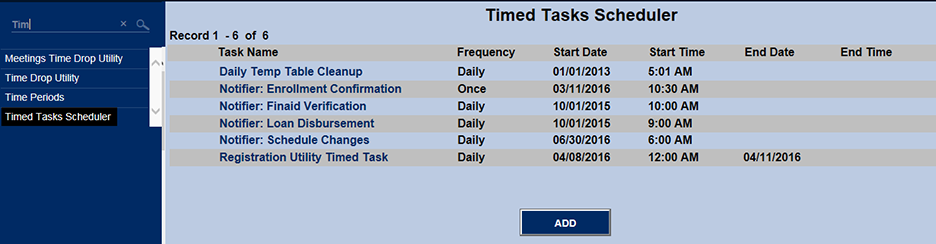
To set up a timed task to Reconcile Course Section Seats, click on the Reconcile Course Section Seats link in the left menu of the page. Under Task Name, there should NOT be a selection for Reconcile Course Section Seats. If there IS such an option already, the timed task is currently active and there is no need to click on it unless changes are desired. If it does not appear, and therefore needs to be activated, click the ADD button.
The Timed Task Scheduler activation page requires that:
• Reconcile Course Section Seats is highlighted in the Task Name drop.
• A Frequency is selected. Daily is the default.
• Start Date and Start Time are entered. End Date and End Time are not required, but can be entered, if necessary. The Time values have a separate drop for both hours and minutes, followed by the choice of either AM or PM.
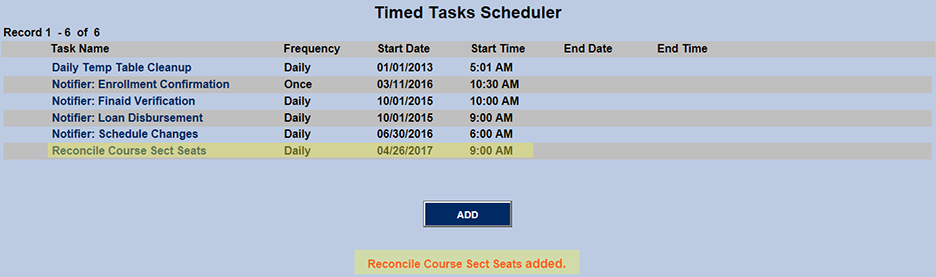
After clicking the Submit button, the Reconcile Course Section Seats timed task displays as activated under Task Name.
After Activating the Timed Task
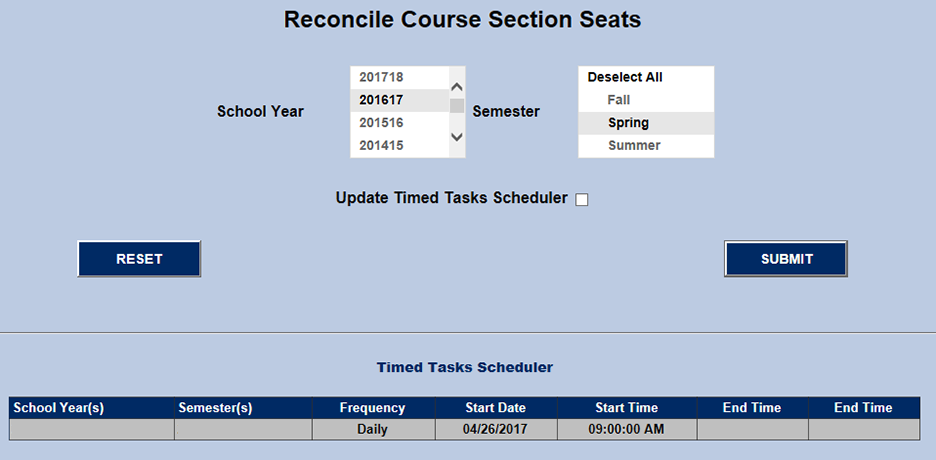
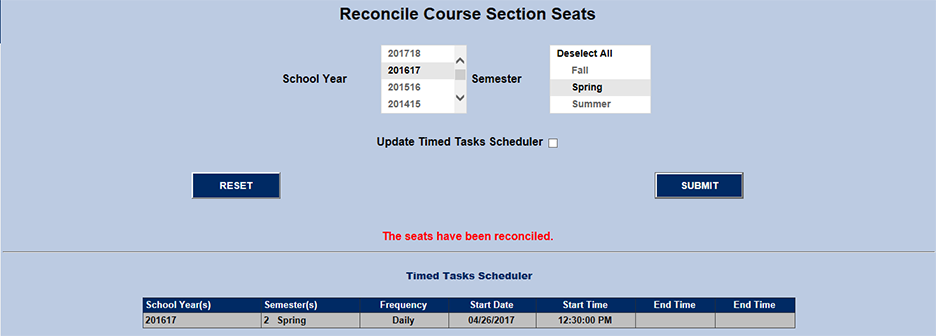
After scheduling the timed task, return to Reconcile Course Sections Seats. There is an Update Timed Task Scheduler check box and a representation of the Timed Task just activated. It's important to note that it only includes values set when the timed task was activated (i.e. all columns except for School Year(s) and School Year(s).
In order for Reconcile Course Sections Seats to function, School Year(s) and Semester(s) must be selected. If the Timed Task were to be run as it appears above, no seats would be reconciled because the utility doesn't know what school year(s) and semester(s) (i.e. course sections) to reconcile.
Reconcile Course Sections Seats must first be run once manually so that the Timed Task knows which course sections to check and reconcile, if need be.
If course sections are found with inconsistent enrollment counts, they will appear as shown below. If Space Taken and Students Enrolled are the same number, they are reconciled. If not, that course section will be shown on the page and Space Taken and Students Enrolled will display in red. A similar comparison is made between Spaces Waiting and Students Waitlisted. If Space Taken and Students Enrolled are equal, and Spaces Waiting and Students Waitlisted are also equal, the course section will not appear because it is completely reconciled.
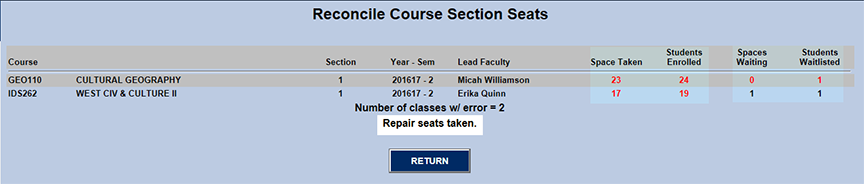
Below is a table representation of the two course sections that were found in need of reconciliation. Space Taken shows the count of sp_taken in the course section table (CRSSECT). Each time someone registers for a course section, sp_taken is supposed to be incremented. When someone withdraws, sp_taken is supposed to be decremented. The same applies to being placed on, and taken off of, the course section's waitlist. The Registration function also adds student course section records (NMCRS). If the student is registered into the course section (i.e. a NMCRS record for that student is created) but there is an interruption (i.e. power outage, etc.) before the function can update the course section record count (i.e. CRSSECT.sp_taken), the count of the student course section records (NMCRS) will be one more than the count shown in the course section record (i.e. CRSSECT.sp_taken). This function fixes that course section count. The waitlist count works similarly, except the CRSSECT.waiting is compared to the number of students waitlisted for the course section in NMWAIT.

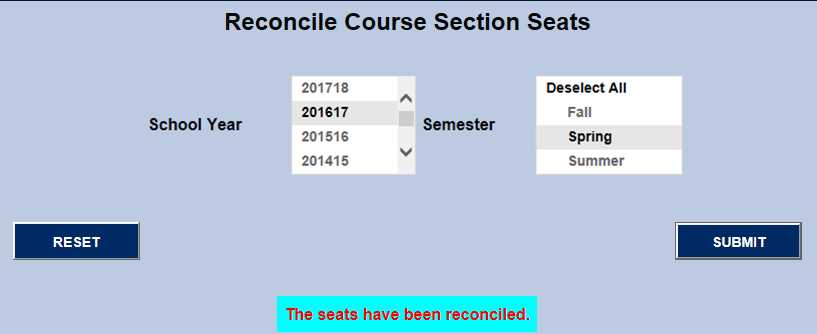
To reconcile the seats, the link Repair Seats Taken must be clicked. When it is, the message The seats have been reconciled is returned.
If the same school year(s) and/or semester(s) are immediately used to reconcile again, the No records match your criteria message is returned. This means all of the course sections for those school year(s) and/or semester(s) have reconciled seats.
To change the school year(s) and/or semester(s) used by the timed task, reset the values by running Reconcile Course Section Seats manually with Update Timed Tasks Scheduler checked and different school year(s) and/or semester(s) highlighted.
The screenshot below shows how the timed task appears if 201617/2 is changed to 201516/1 and the Update Timed Tasks Scheduler checkbox is checked.

When multiple school years and/or semesters are selected, the resulting timed task display will resemble the screenshot below.
