Executive Dashboard Display Types
Overview
The Executive Dashboard, available in the Systems hub, provides summary data about an institution and the student body in a pictorial manner. The display categories are defined by the institution and can be selected by time period. Visit the Executive Dashboard page for broad information on setup and use.
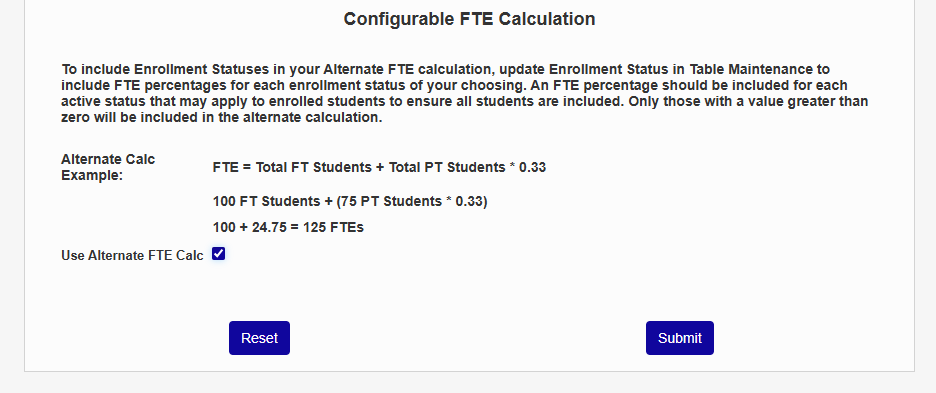
Configurable FTE Calculation
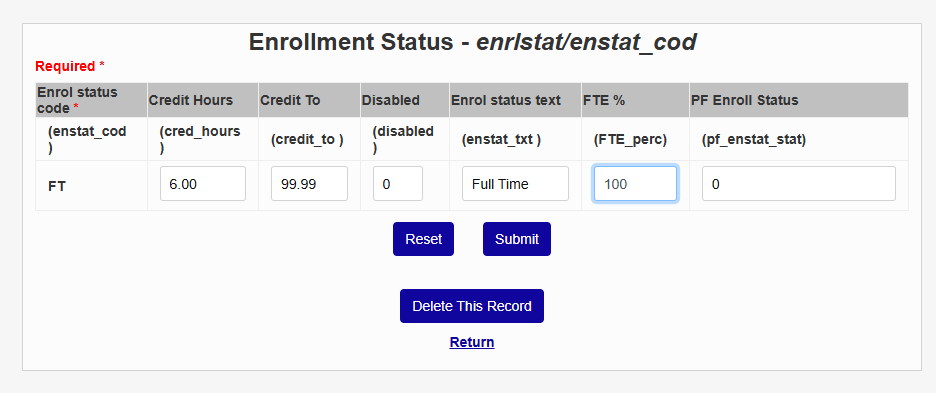
This section of the page should only be used by schools that calculate full-time enrollment differently than the standard SONIS method. To use an alerternate full-time enrollment calculation method for the Executive Dashboard, first set up your calculation scale using the Enrollment Status table in Table Maintenance. Create a new record or edit an existing record and add a value to the FTE% field.
Then return to this page and check the the Use Alternate FTE Calc box to activate the custom calculation on the dashboard.