Prospective Students
Overview
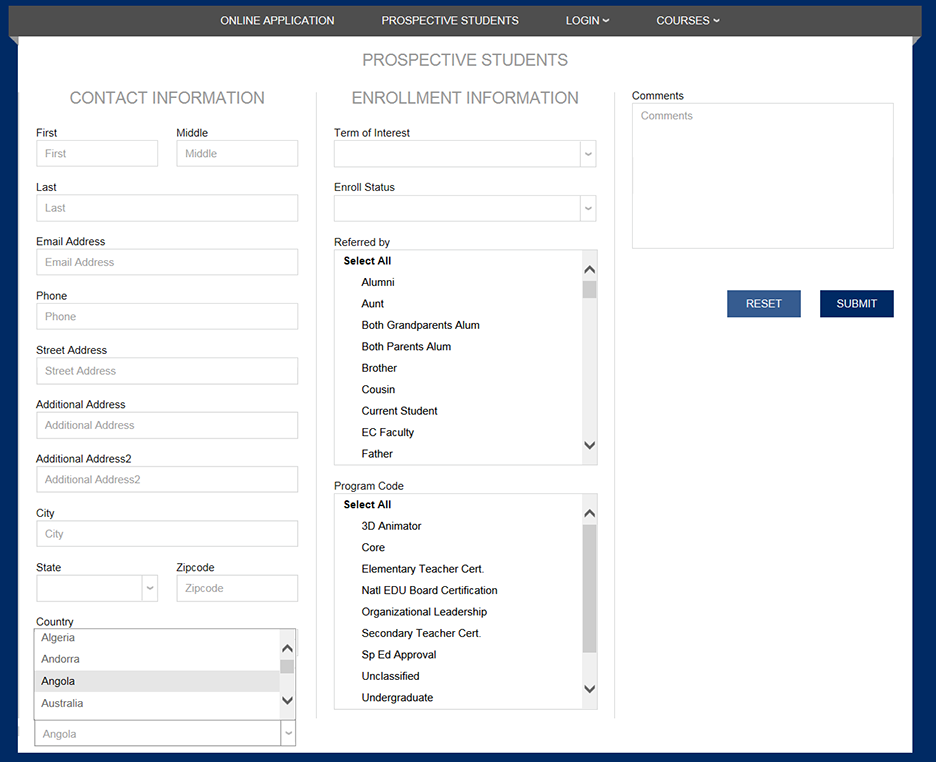
This function is for individuals who are thinking about becoming a student. By filling out the Inquiry Card, the prospect establishes first contact with the school that can be followed up by asking questions of the school and possibly becoming an Applicant by filling in the Jenzabar SONIS Online Application or applying through some other method. Before individuals can express interest in the school, the school must set-up a link that points to the Web Inquiry Card for prospects.
Setup
The Prospective Students login link is enabled using Login Page Set-Up. The opening page of that utility, not shown here, consists of all of the login pages in Jenzabar SONIS. These pages include the user status logins (i.e. Student, Faculty, etc.) that actually log an individual into their account. From there, various functions are available as needed by that user status.
But there are other logins that are available to anyone and are basically functions themselves. The Prospective Students page is one of those function logins. The login is enabled by choosing it from the list of logins in Login Page Set-Up.
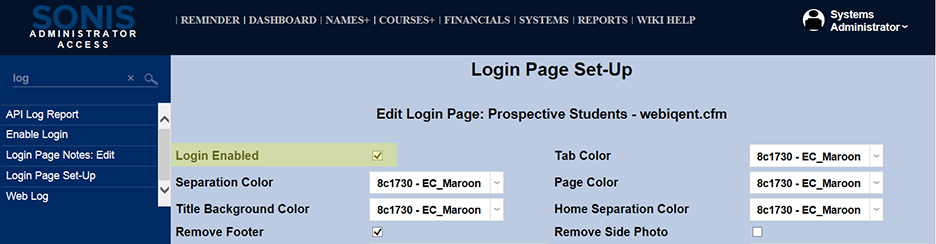
Once the login page is enabled, a link for "Prospective Students" should appear on the index page. It is separate from the "Login" drop because the individual is unknown to Jenzabar SONIS until their Inquiry Card is completed and saved. Even then, there are no functions that a "Prospective Students" can access. This login exists for the opening communication only.
Note
The location(s) of this link relates to the default index page. Some school decide to put the login links in some other arrangement. For example, they may use a school specific page for their login links rather than use the index page (i.e. index.cfm) provided. Otherwise, the login link work as described.

The Prospect Web Inquiry page, when activated, should look very similar to the image below. The content of the page can be altered using the Prospect Web Inquiry Card utility.