Bulletin Board Maintenance
Overview
The Bulletin Board Maintenance utility, available in the Systems hub, allows Jenzabar SONIS administrators to identify bulletin board posts or users that should be restricted and gives the ability to remove or disable the posts. It may also be used to identify posts and users that have been previously restricted. Automated Restrictions are defined on this page.
Managing Bulletin Board Posts
Bulletin Board Categories are used to create and enable Bulletin Boards that display in the Faculty and Student portals. Once bulletin boards are created, and posts have been made on them, the ability to Remove/Disable Bulletin Board Postings is enabled. Click Remove/Disable Bulletin Board Postings to begin. Enter the User ID of the person that made the post being searched for in the provided field.
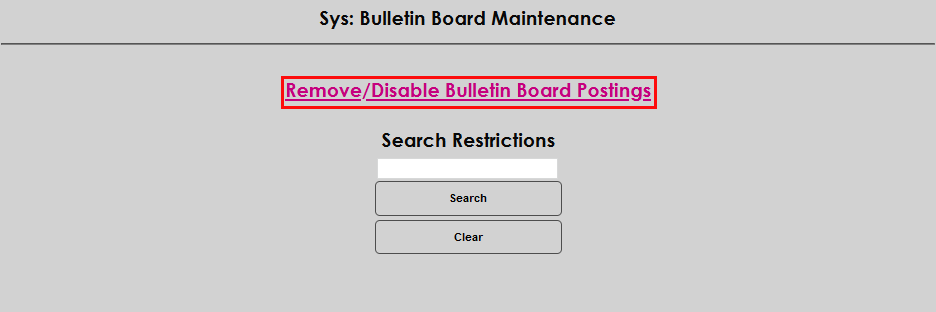

Click Search. If an ID was entered that matches a user who has made posts, a statement will appear that includes the user's name and User ID, and radio buttons to Select All to Show, Disable, and Delete. When the page populates, the Show radio buttons will be populated for each post that is currently displaying in the portal bulletin board.

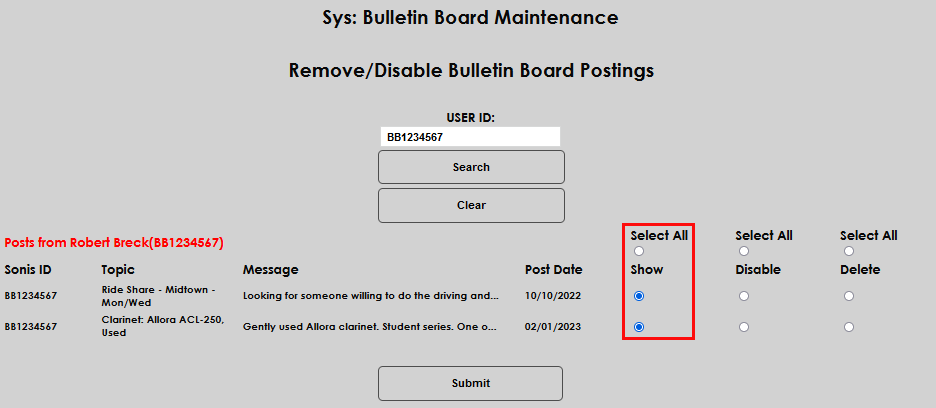
To Disable a post, click the corresponding Disable button. Or, to Disable all posts, click the Select All button above Disable. Although the Select All button will not populate or change color, the buttons associated with the posts will.


To Delete a post, click the corresponding Delete button. Or, to Delete all posts, click the Select All button above Delete. Although the Select All button will not populate or change color, the buttons associated with the posts will.


After making the desired selection(s), click Submit to execute and apply the choice. The page will refresh and display only the posts that meet the selected criteria.

