Pass/Fail Registration in Portals
Overview
Some students may wish to take a course with a pass/fail designation rather than receiving a letter grade and/or member institutions may choose to offer courses with that will receive pass/fail grades instead of letter grades. Pass/fail registration is available through the Student and/or Faculty portals.
Setup
To allow pass/fail registration through the Student and/or Faculty portals, navigate to the Web Options page under the Systems menu. Check the Student Pass-Fail Registration box and/or the Faculty Pass-Fail Registration box and click Submit to save the changes.

Student
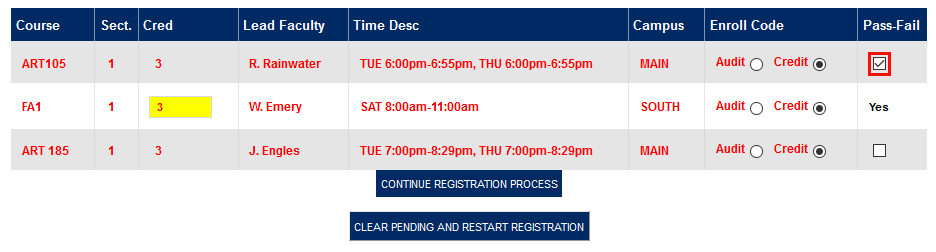
Once the pass/fail option has turned on, students will see a checkbox in the Pass-Fail column when registering. If the course is set up to be pass/fail for all students, the column will still note this in text and not allow students to change the setting. Students should check the corresponding box and click Continue Registration Process to take a course with the pass/fail designation.
Faculty
The pass/fail option displays identically on the Faculty portal. When the option has been turned on, faculty members will see a checkbox in the Pass-Fail column. Just as in the student portal, courses that are set up to always be pass/fail will have text notifying the user of that fact in the place of a checkbox. Check the corresponding box and click Continue Registration Process to register a student for a course with the pass/fail designation.