Extra Fields
Overview
Extra or custom fields are special fields that can be used by a school to store data that is not otherwise stored by Jenzabar SONIS. These fields are simply used to save data. No functionality involves these fields beyond saving their headers and values for display on a specific page near the bottom of that page.

Note
If, after following the instructions below, the fields do not appear at the bottom of the selected page, it may be that the selected page has not been setup to use extra/custom fields. If this issue occurs, please contact Jenzabar SONIS Support and let them know the extra fields that won't activate. Support will follow-up and make those extra fields available whenever possible.
Setup
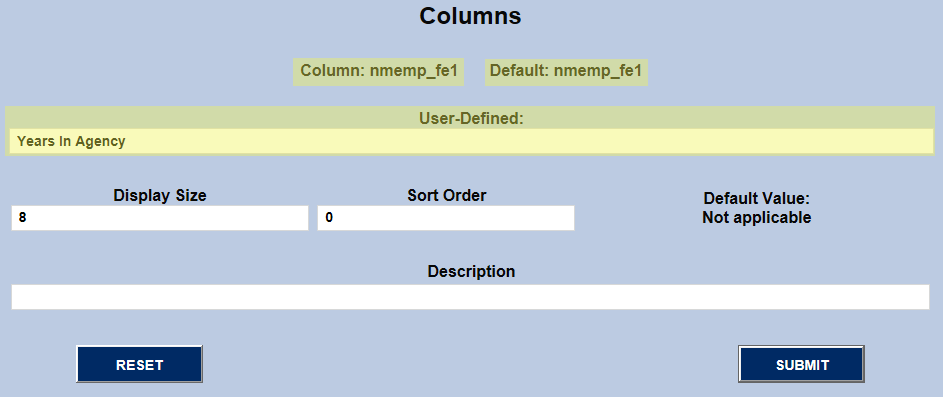
A custom/extra field (Ex. "Years In Agency") is activated by first finding the name of the field (ex. nmemp_fe1) and submitting it.
Extra/custom fields are named after the tables in which they can be found. The "Education" page under "Names" is stored in the NMEMP table (i.e. "NM" for "Name" and "EMP" for "Employment". Each of its extra/custom fields, therefore, begin "nmemp_" and then the datatype and number of the field:
"nmemp_" + "ce" (character, extra) + "1" (first of type) . . . "nmemp_ce1" (Ex. "Smith")
"nmemp_" + "de" (date, extra) + "1" (first of type) . . . "nmemp_de1" (Ex. "04/15/2017")
"nmemp_" + "fe" (float, extra) + "1" (first of type) . . . "nmemp_fe1" (Ex. 7.25)
"nmemp_" + "le" (logical, extra) + "1" (first of type) . . . "nmemp_le1" (Ex. 0, 1 / N, Y)
"nmemp_" + "ne" (numeric, extra) + "1" (first of type) . . . "nmemp_ne1" (Ex. 1, 2, 3 . . . )
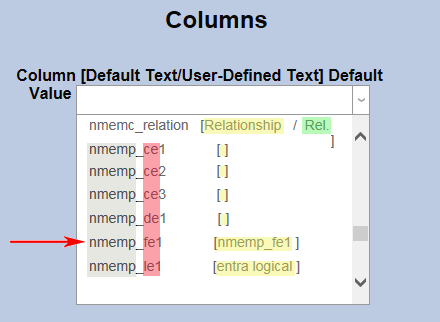
After the field names are brackets ([ ]) within which are the fields' default column headers (dname) followed by the user's column headers (uname). If there is a "uname", it is used. If not, the "dname" is used.
In the first row below, Relationship is the "dname" and Rel. is the "uname". Because a "uname" exists, when the field "nmemc_relation" appears on a page, it's heading is "Rel." For example:
Rel. father
[ ] indicates that the field has no "dname" or "uname". Therefore, if the field displays, only its value would appear. This would likely result in the columns on the page misaligning because the header column would be NULL.
"[nmemp_fe1]" indicates that "nmemp_fe1" is the default header (dname) of field and there is no "uname" value.
When the name of the field is found and submitted, the template for adding a user-defined name (i.e. "uname") displays on the page. Typically an administrator needs only to enter the "uname" of choice. The "Display Size" is changed only if the header displays as a font size out of sync with the rest of the text on the page. "Sort Order" is typically not used, and if the "uname" header is descriptive enough, "Description" can be left blank. "Description" does not appear on the action page but rather is only used in "Columns" as additional information about the column.
Once the user-defined name is submitted, it is recommended that the administrator then call up the page on which the field displays to make sure the extra/custom column appears and that it appears with the correct header.