Return Non-Refundable Aid to Financial Aid
Important
Information and features vary according to the roles to which you belong and the permissions associated with those roles. For more information, contact your module manager or your campus support team.
Note
This page is only available for schools licensed and configured for Open Items accounting with the "Apply Aid First" setting turned on.
Use the Return Non-Refundable Aid to Financial Aid page to Return Non-Refundable Aid to Financial Aid. This process reads invoice transactions from multiple invoice batches, or from a single specified batch, with a Source Code of IV that is associated with Non-Refundable aid for the specified Financial Aid period. It also generates the required files to return unused funds to Financial Aid. The process works with both Jenzabar Financial Aid and PowerFAIDS.
 |
Permissions Required
To access the Return Non-Refundable Aid to Financial Aid page, you must be in a Receivables Management role with the "Can Return Non-Refundable Aid to Financial Aid" permission.
Desktop Location
You can also complete this process from the Desktop Return Non-Refundable Aid to Financial Aid window.
Database
Invoice batches must have the following required fields: ID_NUM, FAP_CDE, FUND_CDE, OI_SOURCE_CDE, OI_GROUP_NUM, OI_TRANS_KEY_LINE_NUM, FINANCIALAID_SYSTEM_CODE, TRANS_AMT.
When the process runs successfully, a new audit record is inserted into trans_hist_ext_pf table.
How To
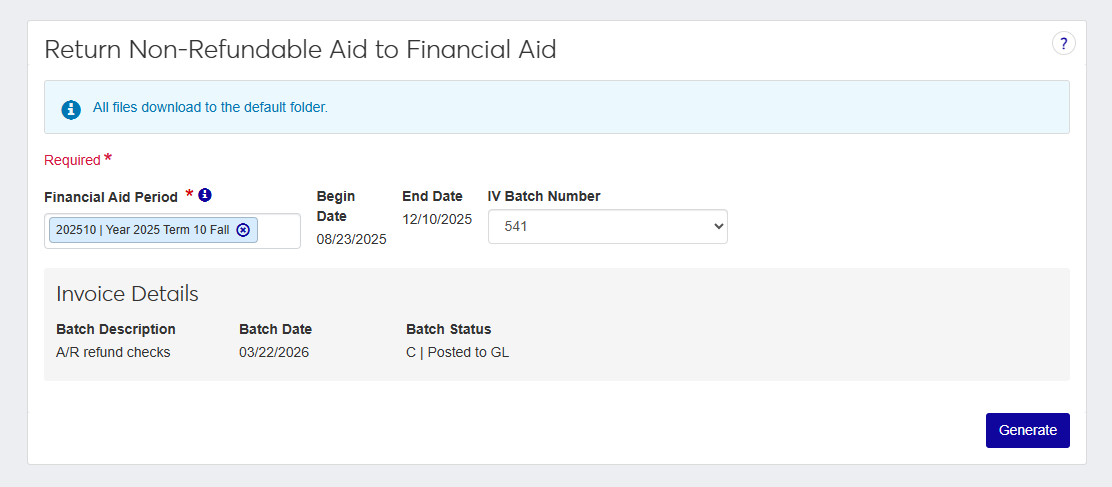
Select a Financial Aid Period. This field is single-select and required.
The Begin Date and End Date are automatically set based on the financial aid period selected and cannot be edited.
Select an IV Batch Number.
The Batch Description, Batch Date, and Batch Status are automatically set based on the selected IV batch number.
Click Generate. The date is set to today's date by default, but you can update it to any date within the current or future fiscal year.
Note
When the process runs, you will either receive a success message informing you that the process has run correctly or a failure message explaining why it was unable to be completed. If the process is run successfully, a copy of the data will be saved to your default Downloads folder.
Why can't I access this page?
Either your system is not licensed and configured for Open Items with the "Apply Aid First" setting turned on or you don't have the proper Receivables Management permissions.
Why did an alert appear telling me that I had no eligible IV records?
One of four things is true. Either no IV transactions match the FAP code, or all transactions are refundable, or all have been returned, or none meet filtering requirements.