Create Roles
Important
Information and features vary according to the roles to which you belong and the permissions associated with those roles. For more information, contact your module manager or your campus support team.
Create and copy role options both create a new role. The difference between them is that when you choose to create a role, you can only base the new role on a Jenzabar-provided one. When you create a new role by copying an existing role, you can use your school's own custom roles or a Jenzabar-provided role. Copying a role is useful when creating role variations that share similar access requirements.
Both processes follow six steps:
Select the role template on which the new role will be based.
Use create a new role to select a Jenzabar-provided role.
Use copy a role to select one of your school's custom roles. You can also select a Jenzabar-provided role, but the advantage of copying is further tailoring your custom roles.
Update the role name and description.
Select the permissions users assigned to the role should have.
Assign users to the role.
Configure module access settings.
Configure associations and user-defined form permissions, if applicable.
When new permissions are added to a role, the default role automatically enables those permissions and users immediately have access to those new features. Copied roles do not. The new permissions are available, but not enabled. This gives admin users a chance to ensure they want users in those roles to have those features.
Jenzabar recommends using a role name that most administrative users will easily understand. For example, you can base role names off of your organizational hierarchy to quickly distinguish permissions.
Jenzabar recommends tailoring the new role description by briefly describing the role. This can be particularly helpful in distinguishing multiple roles with similar permissions.
Click the Create role button. The Create Role page appears.
From the Role Template drop-down, select the role template you want the new role to be based upon. The New Role Name and New Role Description fields automatically show the name and description of the original role template.
In the New Role Name field, update the role name to an easily recognizable name. The name can be based on how roles/positions are set up at your school as well as distinguish how this role differs from the role template.
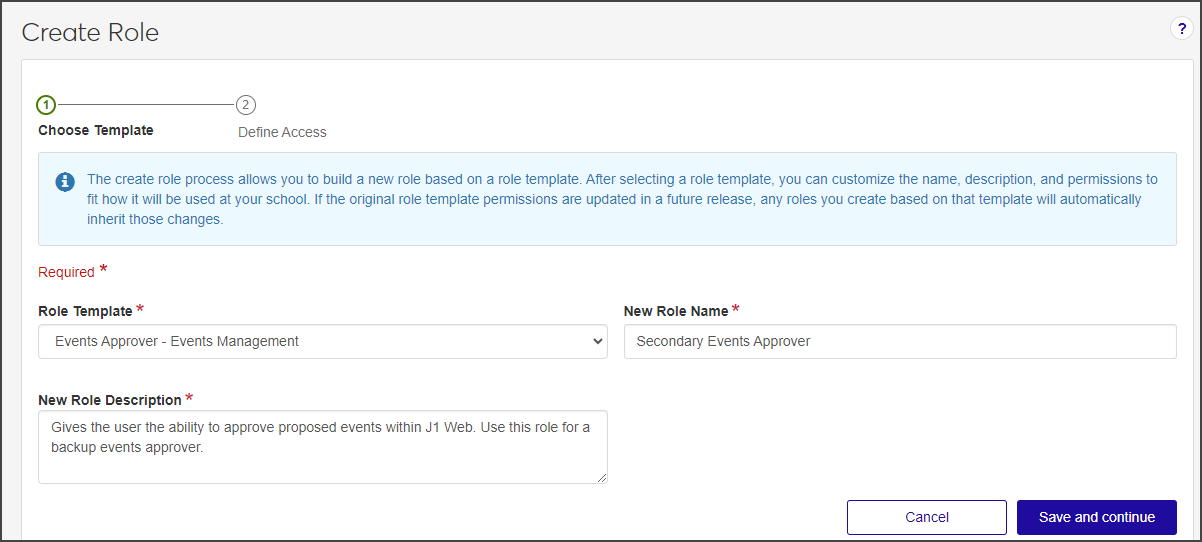
In the New Role Description field, update the description to highlight permissions or features available to users assigned to the role. The description can help distinguish how the new role differs from the role template.
Click Save and continue. The Define Access options appear.
Select the checkboxes of the permissions you want to enable for this role.
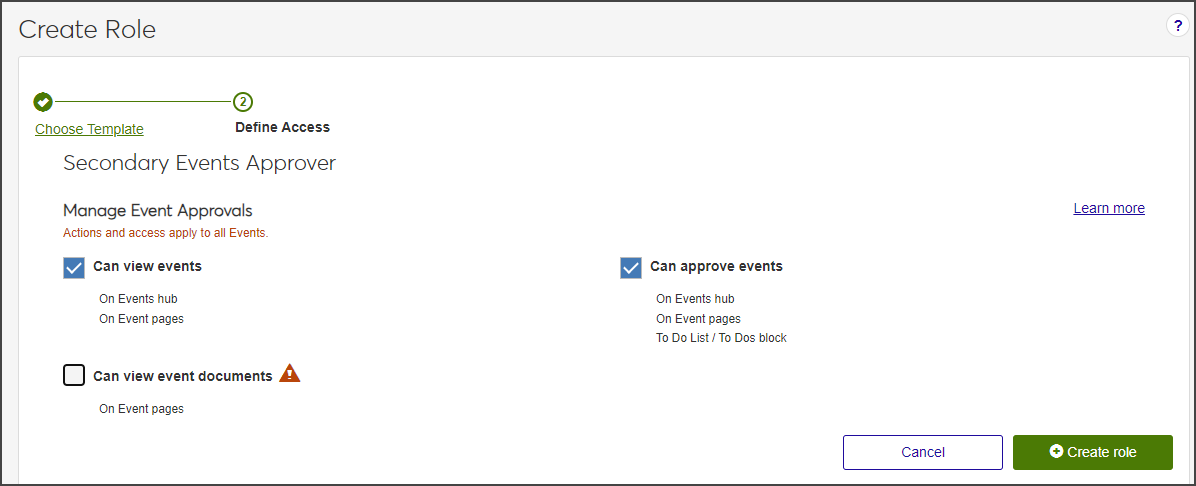
Click Create role. The Create Role page closes and the System Roles page reappears.
Create a role creates a new custom role based on a Jenzabar-provided role template. You select the permissions and settings to enable for the role.
Copy a role creates a new role based on an existing role. The new role inherits the source role's Permissions, Module Access settings, and User-Defined Field permissions, providing a starting point that can then be modified. Users and Associations are not copied.
Note
In either case, copied or created, only the permissions are inherited. No users are copied over with the new role.
The role template is provided by Jenzabar and cannot be modified. This helps ensure the base template can easily be identified by other administrative users when creating roles. You can tailor the name of the role being created using the New Role Name field.