Manage Vehicle Settings
Important
Information and features vary according to the roles to which you belong and the permissions associated with those roles. For more information, contact your module manager or your campus support team.
In the Manage Vehicle Settings window, Vehicle Administrators with the necessary permissions can determine:
If the Vehicle Incident Report number is generated automatically by the system (the default) or set manually by the user.
The default status of a vehicle incident report when the report is created.
To edit these settings, you must be in the Vehicle Administrator role (or a role copied from it) with the "Can manage vehicle settings" permission enabled.
From the Hub options drop-down on the Vehicle Administration Hub page, select Setting options, then Manage vehicle settings. The Vehicle Settings page opens.
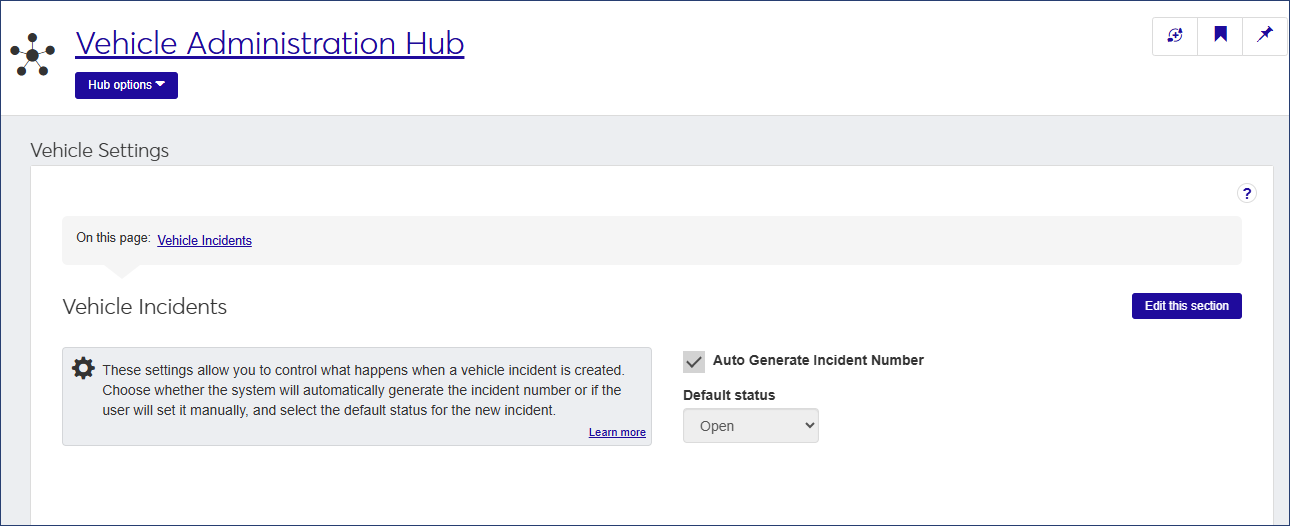
Click Edit this section.
If you want the incident report number to be generated automatically, select the Auto Generate Incident Number checkbox. Deselect the checkbox if you want the number to be set manually. The checkbox is selected by default.
To set the default status of incident reports when they are created, select an option from the Default status drop-down.
Note
This setting determines the initial status of the incident. To update the status, edit the incident details.
Click Save this section to save the change.
The setting will be applied to all Vehicle Incident Reports.