Manage Check-In Groups
Important
Information and features vary according to the roles to which you belong and the permissions associated with those roles. For more information, contact your module manager or your campus support team.
Check-in groups help you manage how, when, and where your residents check in to student housing. You will need at least one check-in group in order to use the check-in feature, but multiple groups will make it easier to manage groups checking in on different days, or with different check-in agreements. You create the check-in groups as you set up your check-in process. Once the process is broadcast, you are no longer able to edit, add, or remove students.
How To
Before you can create a check-in group, you will need to create the session this group will be a part of and import residence spaces. Check-in groups cannot be created after the check-in process has been broadcast.
On the Session summary page, scroll to the Check-In and Check-Out block and click the [#] groups link next to Number of Check-In Groups. If you haven't created any check-in groups, the link will say "0 groups."
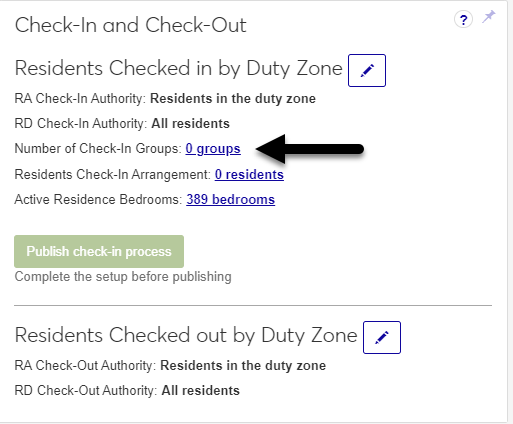
The Manage Check-In Groups page opens.
Click the Create check-in group button. The Create Check-In Group window opens.
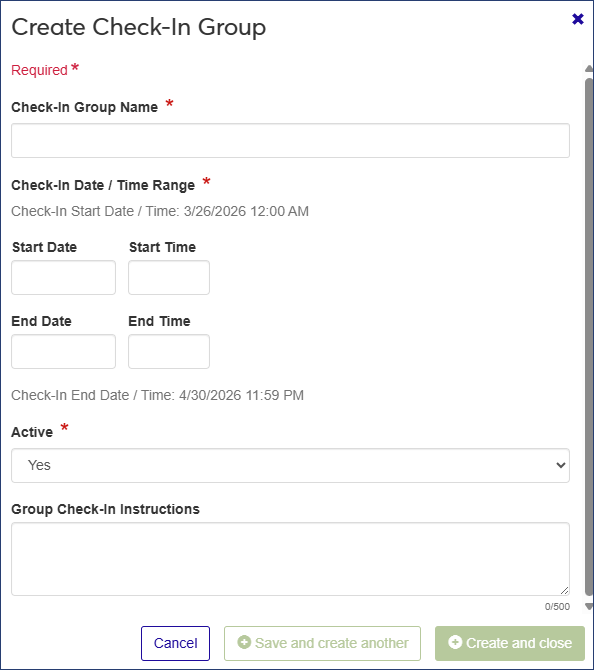
Required fields are indicated by a red asterisk.
In the Check-In Group Name field, enter a descriptive name for the check-in group—for example, Returning Residents, Freshmen, or Football Team.
In the Start Date and Start Time fields, enter the date and time that this group can begin checking in.
In the End Date and End Time fields, enter the last date and time that this group can check in.
If you want the check-in group to be available to assign to students, leave the Active field set to Yes. If not, select No.
In the Group Check-In Instructions field, enter the instructions that will be sent to the students in this check-in group when it is broadcast. This might include the building or room to report to, documents to bring, contact information, etc.
Note
This is not the check-in agreement they will sign when they check in.
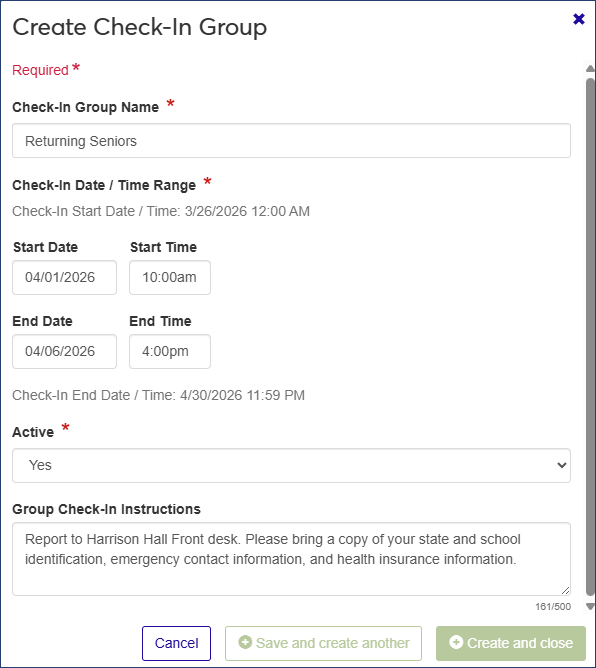
Click Save and create another to save the group and create another one, or Create and close to save the new group and return to the Manage Check-In Groups page. The new check-in group is added to the list.