Manage Submissions
Important
Information and features vary according to the roles to which you belong and the permissions associated with those roles. For more information, contact your module manager or your campus support team.
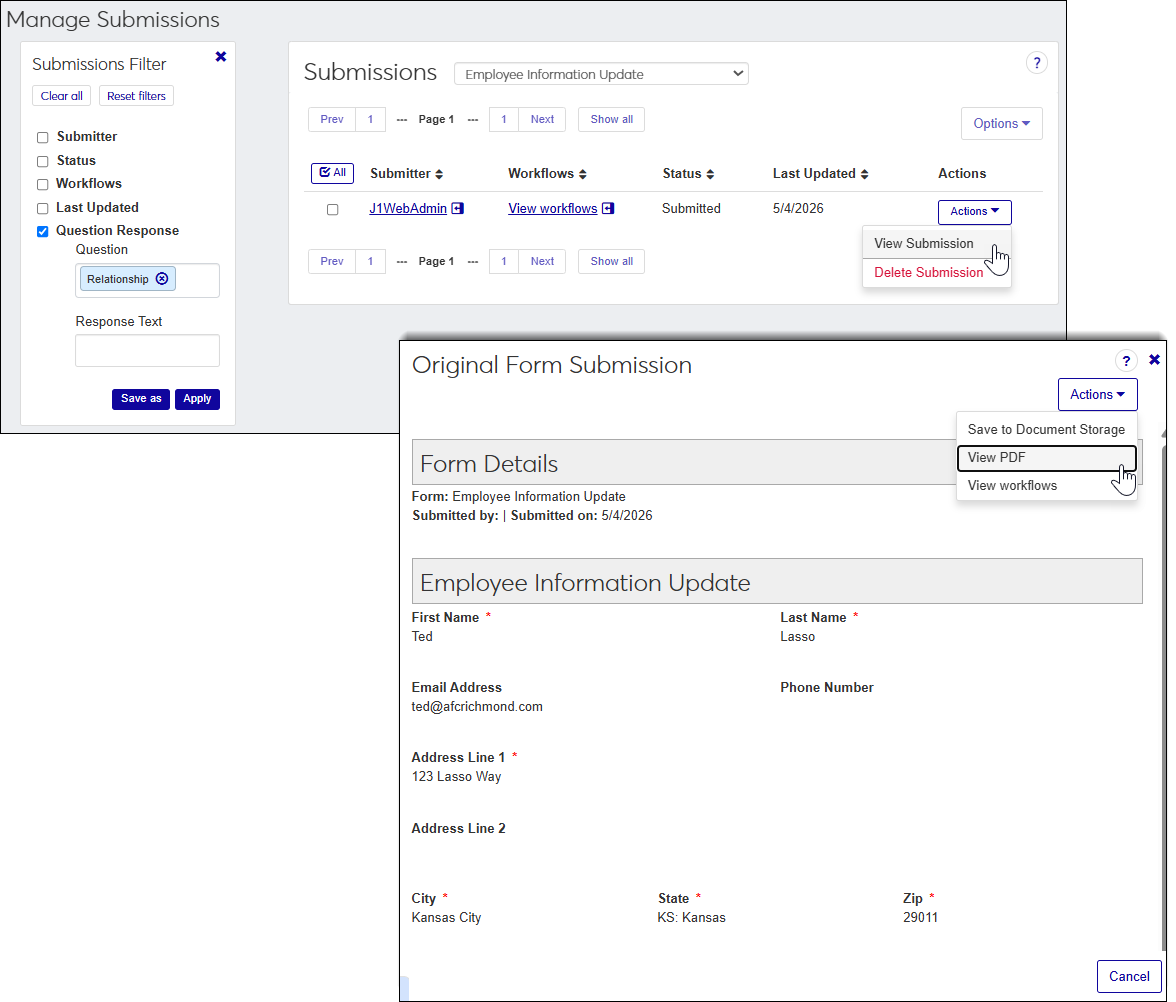
The Manage Submissions page lets authorized users review, manage, and process completed form submissions. From this page, reviewers can view submitted responses, download PDFs, save submissions to Document Storage, associate workflows, and delete submissions when appropriate.
Note
Permissions to forms are controlled by module access codes, which are loosely based on Desktop's Module Code Stamp. Users can have access to multiple codes through one or more assigned roles.
Note
Form reviewers can view all information contained in a submission. If a form collects sensitive, confidential, or regulated information, establish roles and module access codes that limit access to only those users who require it for their job responsibilities.
Access to form submissions is controlled by module access codes and role permissions.
To access the Manage Submissions page, users must belong to a Forms role with permissions to manage submissions enabled.
Access the Connect hub, Forms module, Manage Submissions.
How To
If filter options aren’t appearing, click the No filters applied link. You can refine submissions in several ways:
Note
Select the form you want to view the submissions for by first selecting it from the Submissions drop-down.
Using a filter or combination of filters to view submission (e.g., submitter, status, workflows, last updated, and question response).
Using the column headings to sort forms
Access the Connect hub, Forms module, Manage Submissions page.
From the Submissions drop-down, select the form.
Find the submission you want to print or save as a PDF.
From the Actions drop-down, select View Submission. The Original Form Submission window appears.
From the Actions drop-down, select View PDF. A PDF version opens in another tab that you can save or print.
Note
Some forms are configured to automatically save submissions to Document Storage. Use this procedure when a submission was not automatically saved or when a reviewer needs to manually save an individual submission.Access the Connect hub, Forms module, Manage Submissions page.
From the Submissions drop-down, select the form.
Locate the submission.
From the Actions drop-down, select View Submission. The Original Form Submission window appears.
From the Actions drop-down, select Save to Document Storage. The Save to Document Storage window opens.
Select the Document Storage and Document Type to determine how the PDF is stored and who can access it.
Note
Category and type options are determined by Document Storage settings managed in the Desktop.
Only users with permission to a selected category will be to view the PDF that gets generated.
Click Save. A PDF version of the form is saved to Document Storage and associated with the submitter.
Access the Connect hub, Forms module, Manage Submissions page.
From the Submissions drop-down, select the form.
Find the submission whose workflows you want to review.
From the Actions drop-down, select View Submission. The Original Form Submission window appears.
From the Actions drop-down, select View workflows. The Form Submission Workflows window opens.
If there are workflows associated with it, you can:
Find a workflow associated with the submission.
Click No filter applied link to access filter options.
View all workflows associated with the form submission.
Click View all workflows.
View more information about a workflow associated with the submission.
Click the linked name. If the name doesn't show a link, you might not have access to the workflow. Contact your module manager or IT department for more information.
View workflow history and activity.
Click the three dots to the right of the workflow name and select Audit Information.
Refresh the workflow to ensure the latest progress is shown.
Click the three dots to the right of the workflow name and select Refresh workflow.
Change the workflow status to Complete, Incomplete, or No longer needed .
Click the three dots to the right of the workflow name and select Set Status.
To close the Form Submission Workflows window, click the x button in the upper right-hand side.
Note
Some forms are configured to automatically associate workflows when submissions are received. Use this procedure when a workflow needs to be added after submission, such as for exceptions, follow-up reviews, or special processing.
Access the Connect hub, Forms module, Manage Submissions page.
From the Submissions drop-down, select the form.
Locate the submission.
From the Actions drop-down, select View Submission. The Original Form Submission window appears.
From the Actions drop-down, select View workflows. The Form Submission Workflows window opens.
Click Associate workflow. The Associate Workflow window appears.
From the Workflow drop-down, select the workflow you want to associate with the form submission.
Note
Only active workflows you have permission to access are available.
Click Associate workflow. The workflow will initiate.
To close the Form Submission Workflows window, click the x button in the upper right-hand side.
Note
If a submission has an associated To Do, it cannot be deleted because the To Do relies on the submission record.
Access the Connect hub, Forms module, Manage Submissions page.
From the Submissions drop-down, select the form.
Select the submission/s.
Select the checkbox next to each submission you want to delete.
If you are deleting multiple submissions, select Delete Submissions from the Options menu. If you are deleting one submission, select Delete Submission from the Actions menu. A delete confirmation pop-up window appears.
Click Yes, delete. The delete confirmation window closes and the submissions are permanently removed from the system.
FAQ
Not at this time.
Not at this time.
No, they are permanently deleted.
You may not have the appropriate permissions. To delete a submission, you must be in a Forms role with the "Can delete submissions" permission enabled. Contact your module manager or IT department for more information.