Texting Template
Important
Information and features vary according to the roles to which you belong and the permissions associated with those roles. For more information, contact your module manager or your campus support team.
The Texting Template defines the welcome text recipients receive before their first text interaction from your school. Use this message to introduce your school and explain how recipients can stop receiving future text messages.
Twilio's Messaging Policy requires your first message identify the sender and include standardized opt-out keywords (e.g., "Reply STOP to unsubscribe"). Example: By supplying your mobile phone number, you agree to receive text messages from Jenzabar University. Message frequency varies, and message and data rates may apply. To opt-out, reply STOP.
Your welcome message is only one part of your school's messaging strategy. Ensure your messaging practices comply with Twilio's Messaging Policy and applicable regulations.
Tip
Although you can enter up to 1600 characters, SMS messages are delivered in 160-character segments. If a message exceeds 160 characters, it is broken up into multiple texts.
Note
Recipients receive the welcome message only before their first text interaction. Updates to the template impact future first-time recipients but do not resend the welcome message to recipients who have already received it.
From J1 Web, access the System Administration hub, Communications page.
From the Communications, Texting Template section, click Edit this section. Welcome Message with Opt Out options appear.
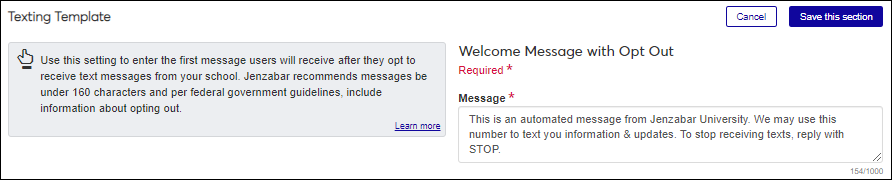
In the Message field, enter a welcome message recipients will receive before their first text interaction. Your message should: identify your organization, explain why recipients are receiving texts, and include instructions for opting out.
Example: Welcome to Jenzabar University! By supplying your mobile phone number, you agree to receive text messages. Message frequency varies, and message and data rates may apply. Reply STOP to unsubscribe.
Note
Texts are limited to 160 characters. You can enter up 1,600 characters of content, but multiple messages will be sent in 160-character chunks.
Opt-out text options: STOP, STOPALL, UNSUBSCRIBE, OPTOUT, CANCEL, END, REVOKE, QUIT.
Click Save this section.