Advanced Search
Important
Information and features vary according to the roles to which you belong and the permissions associated with those roles. For more information, contact your module manager or your campus support team.
The Advanced Search page lets you find people based on specific criteria. For example, name/ID, email, mailing address, phone number, date of birth, and Social Security Number
Permissions Required for Person Searches
Searching for certain information, like email, mailing address, phone number, birthdate, and SSN, may be restricted by role permissions. These permissions are managed through the Person Management and/or External Person Management roles (or copies of them). For additional information, see the following topics:
How To
Note
Depending on your role permissions, you may not see all the search filters.
Click the Search icon
 in the universal toolbar.
In the Search pop-up, Person is selected by default, with the Name / ID filter selected.
To search for a person by a different filter, hover over the Name / ID link and select Email, Mailing Address, or Phone.
Enter the appropriate information to search against, and click the Advanced search or More results link. The Advanced Search page opens with the results from the entered filter information.
To further refine the results, select one or more filters in the Search for box and click Search.
Click the name link to open the person's summary page.
FAQ
When Events is selected in the global search, clicking the "Advanced search" link opens the View Events page. From there, you can use the Event Summary Filter to find a specific event.
When Facility selected in the global search, clicking the "Advanced search" link opens the View Places page. From there, you can use the Places Filter to find a specific location.
You may not be in a role with the appropriate permissions. For additional information about roles and permissions, see the following topics:
For additional information about displaying sensitive information (e.g., SSN), see Data Display.
Legal names are included in the name search, but they are only displayed to users with permission to view legal names.
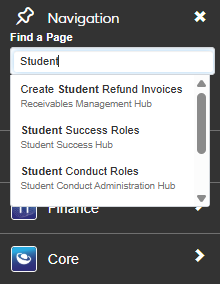
With J1 2026.1, system pages are found using the Find a Page field in the top left system navigation panel. Begin typing the name of a page, and any pages you have access to will appear for selection.