Overview to Accessing Features and Information in J1 Web
Two components drive how access to features and information in J1 Web is controlled: role permissions and module access codes.
Roles Overview
Roles define what users can do in J1 Web. Every user must belong to at least one J1 Web role to access the system. Jenzabar provides standardized roles for each module, which schools can copy and tailor to meet departmental needs. For example, you can set roles up according to your school's organizational or departmental hierarchy. Users can belong to multiple roles, and their access expands accordingly.
Module Access Codes
Module access codes determine which forms, data sets, workflows, interactions, and other resources users can access. They are loosely based on Desktop's Module Code Stamp and are controlled via roles.
Roles can have multiple access codes enabled.
Users inherit access to all resources associated with the access codes in their roles.
Access codes determine which data sets can be used to build dynamic form components.
Access codes determine which workflows can be associated with a form.
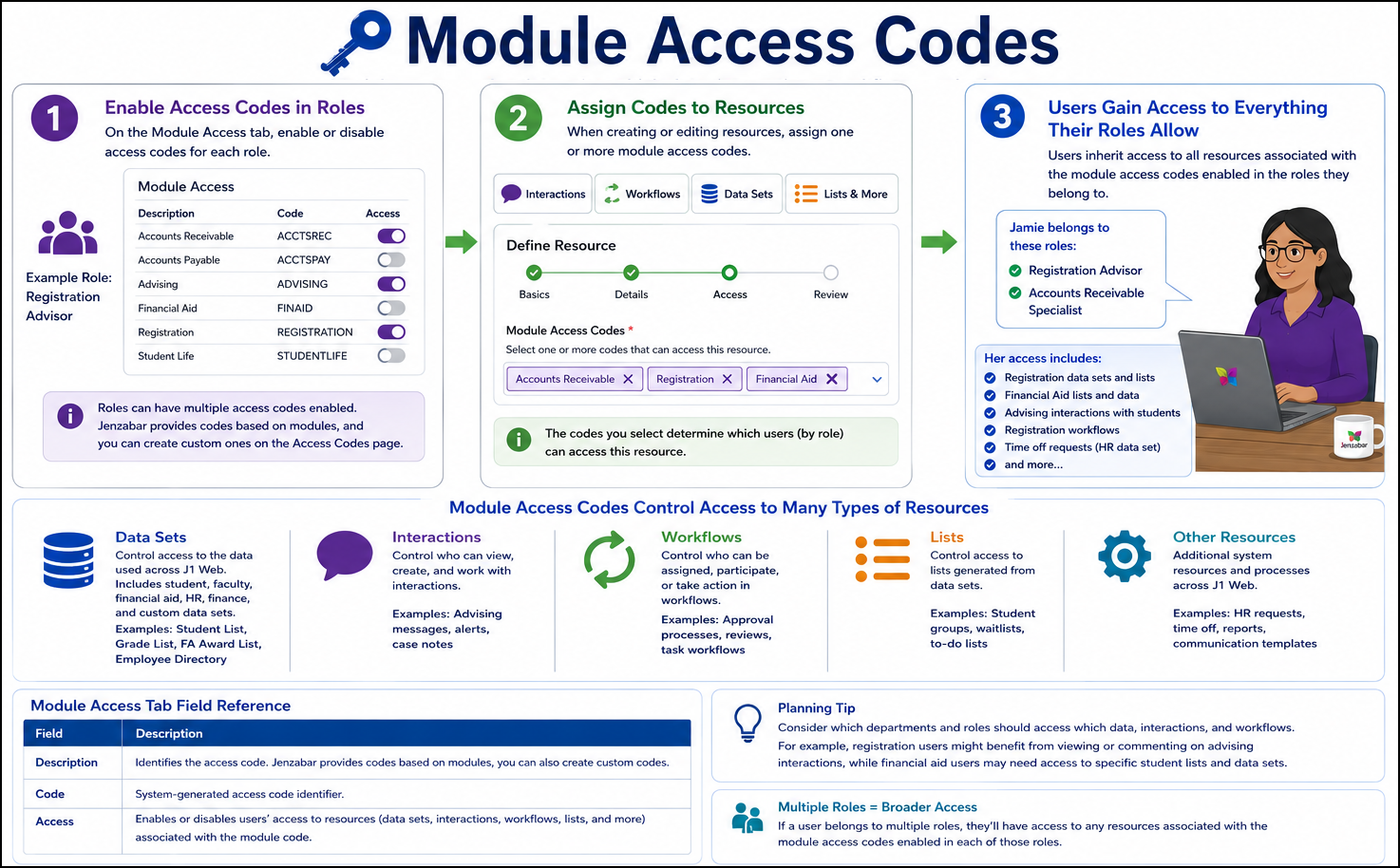
Jenzabar provides default access codes based on Jenzabar modules and you can create custom ones from the Access Codes page. Users assigned to multiple roles can access data sets, forms, interactions, and workflows associated with those codes.
Roles Forms Users Need for General Access
To fully leverage Forms features, users may need to be assigned one or more of the following common roles:
All users that work in J1 Web are assigned to the J1 Web User role, which grants permissions to standard features like bookmarks, calendar, to do lists, and pins. There are different ways to assign people to this role that depend on your authentication method.
To work with person and organization information, users must belong to one or more of the following roles. This might be helpful when assigning forms and viewing information about a form submitter. The following roles let you see name and contact information for people/organizations:
Person Management
Organization Management
External Person Management
External Organization Management
Note
These are the default Jenzabar-provided roles. Your school should have created custom versions with unique names.
Note
To ensure users who are able to search for or access certain people's information (e.g., high-level donors or board members), assign them to a J1 Web Privacy role and define which users they won't be able to access in the system