Understanding Advising Trees
Before you start building advising trees, it's helpful to understand them in the context of the other features they work with. Let's investigate how Advising Trees work with Advising Requirement Codes (ARCs) and Degree / Aim Cross-Reference to track students' progress toward completing their programs.
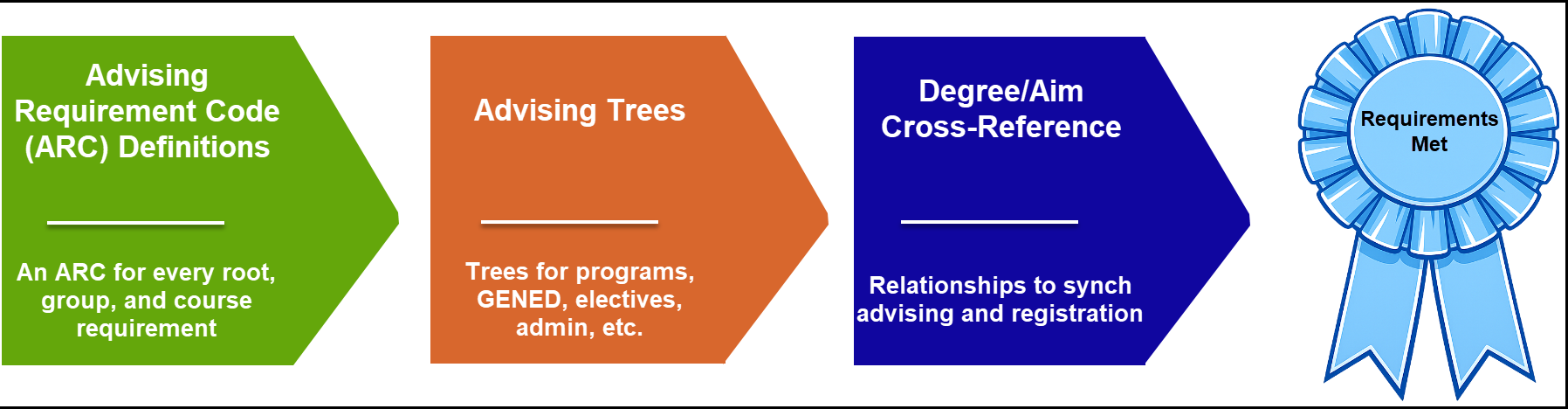
Briefly, here are the roles that ARCs, Advising Trees, and Degree/Aim Cross-Reference play:
ARCs: the requirements (credits, hours, and courses), including all the options and combinations and minimum grades that make up all student programs
Advising Trees: where you select and combine the requirements for specific programs
Degree/Aim Cross-Reference: where you connect Registration to Advising so the system computes the students' progress
 |
Now let's explore each of the features in more detail in order to learn how to best conceptualize advising trees before we build them.
ARCs Represent Requirements to Complete a Program
Let's start with ARCs. At the most basic level, an ARC is the advising equivalent of a course. If your school has a catalog course in the Accounting Department called ACCTG 120, you also create an ARC called ACCTG 120. The course is what the department, the students, and the registrar are concerned with. But for advising, it's all about the requirement—the ARC—being met.
Notice
Your Accounting major requires ACCTG 120. But a transfer student has an equivalent course from their previous school: ACC 1425B. You assign that transfer course the ACCTG 120 ARC, so the student has met the requirement. The student never took your school's ACCTG 120 course, but the advising system looks for the ARC, not the course, and it sees that the requirement is met.
So there's an ARC for every catalog course.
Danger
If a course doesn't have an ARC, or if the wrong ARC is assigned to it, even though a student completes the course, and it appears on the transcript, the requirement still isn't met in advising. The system doesn't count it as contributing toward the student's program. The logic for repeated courses and for prerequisites, corequisites, and prohibited courses also depends on the ARC rather than the course itself.
ARCs for Organizing: Roots and Groups
We've talked about ARCs as course equivalents, but there's another type of ARC: an organizing ARC. For example, a group of elective courses that contribute to the Accounting major are an ARC. And the Accounting major itself is an ARC called a root.
You can think of advising trees as made up of roots (like a major), branches (like groups of required and elective course ARCs), and leaves (like the course ARCs themselves).
Tip
Informally, we call the organizing ARCs "IRQs" (Institutional Requirements). That term isn't in the user interface, but sometimes it's convenient to have a collective term for the roots and groups.
The ARC Table
All your ARCs are defined on the Advising Requirement Code (ARC) Definitions page. Every catalog course gets an ARC. Every major, minor, concentration, and certification program gets an ARC. And every group.
Tip
We call the collection of ARCs the ARC table, a reference to the advising_req_codes database table where the ARCs are stored.
For example, if the catalog has GENED requirements, then GENED is a group ARC. If the catalog has Biochemistry core requirements, then Biochemistry gets a group ARC.
We use the analogy of baking brownies. Your catalog is the recipe book. The ARCs are the ingredients, and the advising trees are the brownies. ARCs are like ingredients that can be used in lots of recipes. English 101 Composition might appear in many advising trees, for example, because many programs require it.
ARCs in Advising Trees
Let's sketch an imaginary advising tree for a Bachelor of Arts degree in Psychology. We'll represent each requirement (each ARC) with a bubble. We'll call our sketch a bubble tree.
Tip
A curious thing about advising trees: they're upside down. The root is at the top, and the leaves are on the bottom.
At the top, we've got the root, the major itself. It's the organizing ARC for all the others. Below it are some course ARCs representing required courses. Then there are more organizing ARCs: groups. There's the Social Science Electives group with two subgroups: the under-300-level group and the 300-level-and-above group. There's also the Major Electives group with three subgroups: Psychology, Sociology, and Geography.
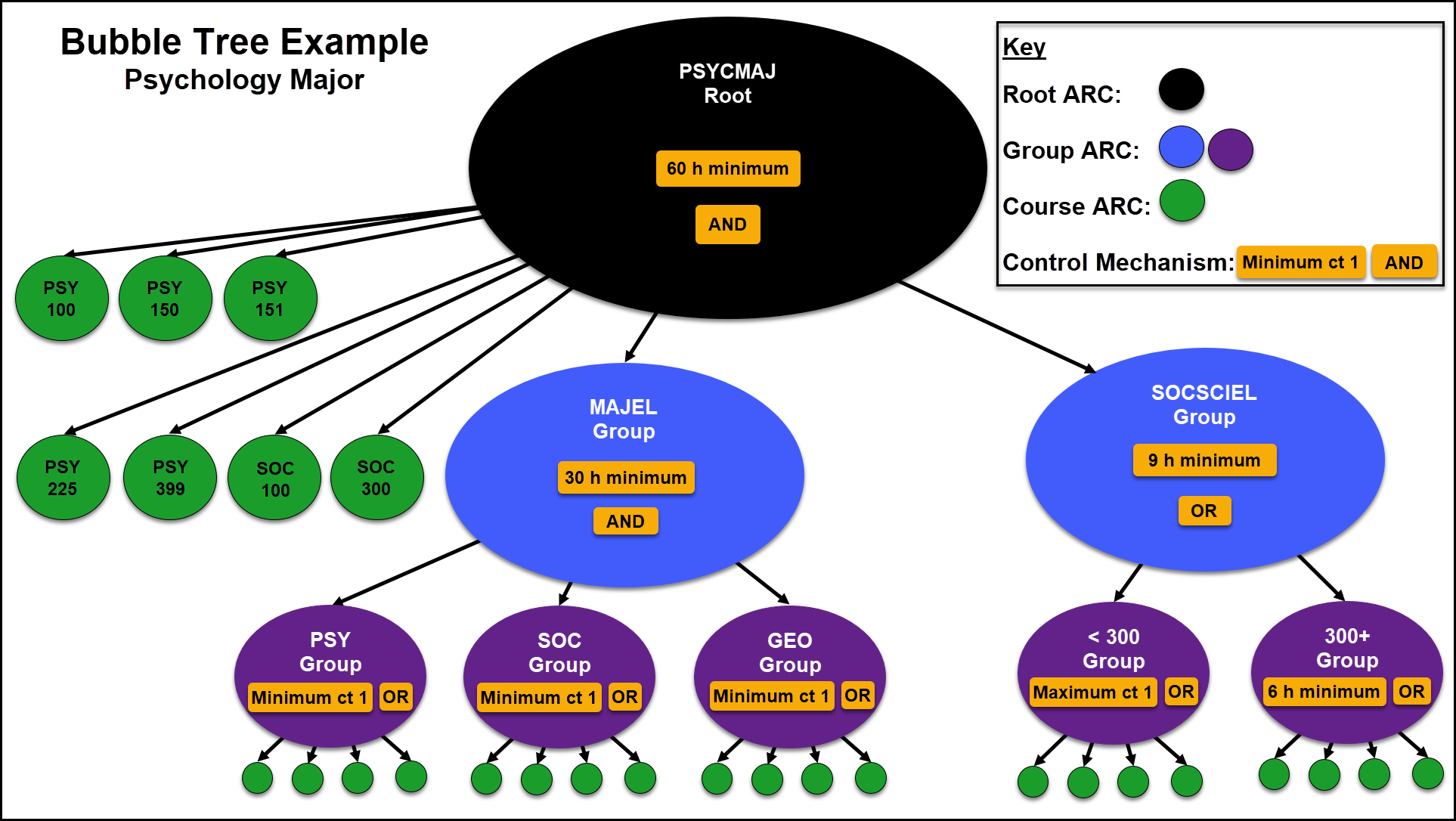
Looking closer, you can see we've noted required credits or course counts.
Root ARC: PSYCMAJ: at least 60 hrs (and all the requirements below)
Course ARC: PSY 101
Course ARC: SOC 100
Course ARC: PSY 150
Course ARC: PSY 151
Course ARC: PSY 255
Course ARC: SOC 300
Course ARC: PSY 399
SOCSCIEL (Social Science Electives) group ARC: at least 9 hrs from the subgroups:
< 200 subgroup ARC: Maximimum of 1 course
> 300 subgroup ARC: At least 6 hrs
MAJEL (Major Electives) group ARC: at least 30 hrs including some from each subgroup:
Psy subgroup: at least 1 course
Soc subgroup: at least 1 course
Geo subgroup: at least 1 course
Note
Notice that each of the subgroups has course ARCs in it. In Advising Trees, each branch must always end in leaves—that is, course ARCs.
Control Mechanisms
These control mechanisms help your advising trees enforce requirements:
Relationships: AND (all are required) vs. OR (there are options) for an ARC
The Grid: Maximum and minimum credit hours and course counts for an ARC
Grades: Minimum required grades for an ARC
Relationships: AND and OR
The first conrol mechanism is Relationships. The AND and OR notations on the bubble tree sketch refer to the relationship between that ARC and any ARC immediately connected to it.
The PSYCMAJ (Psychology Major) root ARC is AND. (Roots are always ANDs.) That means every bubble directly below is required. In our bubble tree, that's all the named course ARCs (like PSY 100) and the MAJEL group and the SOCSCIEL group.
The SOCSCIEL (Social Science Electives) group is OR. That means not all its subgroups are required. In this case, the student doesn't have to take a < 299 course, but they have an option take one to help meet the requirement.
The MAJEL (Major Electives) group is AND. That means each of its subgroups is required. The student must take at least one course from each of the subgroups.
The PSY (Psychology) subgroup is OR. That means the student doesn't have to take all the courses listed in the PSY bubble. (Those course ARCs are tiny orange bubbles in the diagram.).
The Grid of Hours and Counts
The next control mechanism is the grid. Each root or group may have maximums and minimums regarding course counts or credit hours. The grid can be a useful way to represent the requirements graphically.
Minimum | Maximum | |
|---|---|---|
Hours | 9 | 12 |
Count | 2 | 6 |
In the grid above for a group ARC, the student must complete at least 9 hours from at least 2 courses in the group. But no more than 12 hours, and no more than 6 courses from the group will count toward the program.
Here's another scenario:
Minimum | Maximum | |
|---|---|---|
Hours | 6 | |
Count | 2 |
In the scenario above, the student needs 6 hours for the group ARC but a maximum of 2 courses can count toward the requirement. So the student could take two 3-hour courses, or a 4-hour and a 2-hour course, but couldn't take three 2-hour courses. (The third wouldn't count, and the student would be two hours short of the minimum hours.)
The hours and counts on the bubble tree sketch include these:
The PSYCMAJ (Psychology Major) root ARC: 60 hrs min. Students must have at least 60 hours.
The SOCSCIEL (Social Science Electives) group: 9 hrs min. At least 6 hours must come from the 300-level-and-up subgroup. One course can come from the 200-level-and-below group.
The MAJEL (Major Electives) group: 30 hrs min. At least one course is required in each subgroup.
Minimum Grades and GPAs
The third control mechanism is grade. A course ARC may require a minimum grade, and a group or root ARC may require a minimum GPA for all courses in their root or group. Grade minimums aren't listed on our bubble sheet sketch, but you can include them on your bubble trees and advising trees.
Tip
Although it's possible to set a minimum GPA for a major, we recommend using Program GPA Profiles for that purpose. They're designed for tracking a student's in-program GPA.
Making Bubble Trees to Sketch Requirements
We recommend sketching bubble trees like this one. It's a useful step in transforming lists or paragraphs of requirements into advising trees. For example, the bubble tree sketch above may have been derived from a catalog listing like this: "The Psychology Major consists of of minimum of 60 hours including 9 or more hours of social science electives including at least 6 hours of 300-level or higher courses . . .". If you use that description to sketch a bubble tree, you'll have a concise graphic representation that makes building the advising tree much easier.
Tip
When you make bubble trees, remember:
Advising trees are upside-down: root at the top, and leaves at the bottom.
Start with the root, such as the major.
For relationships, use AND to mean the bubbles directly below (on the immediate branches) are required. Use OR to mean there are options in the bubbles directly below. (AND and OR apply only to the next items directly connected, not to those next items' subitems. We say they apply to children only; not to grandchildren.)
The root is always an AND.
Every branch must end in leaves (course requirements). So a branch can have groups and subgroups, but the lowest groups or subgroups must have course requirements.
Course ARCs don't have a relationship (AND or OR) because they're at the end of the tree. They don't have subitems. So only roots and groups (which we call IRQs) have relationships.
Make sure the minimum credit hours required your groups and individual course ARCs add up to the hours required for the root. In our bubble tree sketch, the 21 hours from the individual course ARCs, the 9 from the SOCSCIEL group, and the 30 from MAJEL add up to the 60 required for the PSYCMAJ root.
Tip
Sketching bubble trees on paper helps you work out the math before you create advising trees in J1 Web.
Be careful about making requirements too restrictive. Make the restrictions you need, but none that you don't need. If 2 courses is enough—even if they total less than 6 hours, then make it a 2-course minimum rather than a 6-hour minimum. (That will save you trouble when a transfer comes in with 5.5 hours.) Don't put anything in the grid you really don't need. Otherwise, it gets difficult for students to navigate.
Tip
A minimalist approach is best.
"Aha!" you say. If a student meets all the requirements in the example bubble tree above, they can't help but meet the 60-hour requirement. So in our minimalist approach, can we remove the 60-hour requirement?" Yes. There's no need to state a requirement if it can't be avoided anyway. Good catch!
For example, our example Psychology major has a 60-hour minimum. You could also give it a 60-hour maximum, but that could cause trouble. If there's a 4-hour course available in tree, students who take it might exceed the limit. The system wouldn't count that course and would show the student as not having met minimum hours requirement.
If course counts are good enough, use them instead of credit hours. That can help avoid issues with transfer courses (as from a school on the quarter system). Use credit-hour minimums only when you need to, such as when you have variable-credit courses in the group).
Degree/Aim Cross-Reference
The Degree/Aim Cross-Reference page is where you map registration majors, minor, concentrations and certifications to ARCs. That way you synchronize the two modules. For example, you map the following together so that Advising can track progress toward a student's Psychology degree.
Registration program: BA - Psychology
Advising root ARCs that are mapped to BA - Psychology:
PSYCMAJ root ARC including all its group and course ARCs
GENED: general education
*FREE: free electives
TOTCR124: 124 total credits needed to graduate
#ADMN: miscellaneous courses
Summary
The concepts behind ARCs, advising trees, and Degree/Aim Cross-Reference are important. We recommend taking the training courses listed below and practicing with bubble tree sketches before starting to build your trees.
The good news is that once you understand the concepts, it's relatively easy to build the Advising Trees. You can search, drag and drop, view details, and make sure it's all synchronized with Registration so that the system tracks your students' progress and helps you keep them on track.
FAQ
Can I put all of a program's requirements in one root?
No, not if there are complex options. Especially if a student can double major or have a minor or a concentration, you need multiple roots.
Notice
A typical tree for a a major might have the major root, a GENED root, a *FREE root for free electives, a #ADMN root for miscellaneous courses, a root for a total of 124 credits, and so on. The worry is that if your programs have single roots, but a student adds a second major, for example, then GENED will appear twice in their plan, and the system will be confused.
Yes, if the requirements are just a list of courses without complex options, and there are no double majors, minors, or concentrations.
Jenzabar Academy Courses
Conceptualizing Trees in Advising
Creating Bubble Trees in Advising
Managing Advising Trees in J1 Web
