Recipient Opt-In and Out
Recipients can choose whether they receive text messages and email communications from your school. J1 tracks each phone number and email address independently using its Verified Status.
When a recipient consents to receiving messages, their status is Verified.
When a recipient opts out, their email/phone number status changes to Unsubscribed.
If a recipient has multiple email addresses or phone numbers, each one maintains its own subscription status. Opting out of one contact method doesn't automatically unsubscribe the others. If they want to cease all communications, they need to unsubscribe from each.
Regulations Impacting Communications Plus Schools
In 2026, Twilio released a Messaging Policy to classify all text messages as either informational or promotional, each with its own consent requirement. Consent is specific to eh message subject. See Opt-In below for what's required for each type.
Opt-In
Recipients consent to opt in to receiving text messages.
Consent for informational text messages (e.g., advising reminders, application updates, billing and financial aid notifications, class or schedule changes, or registration information) can be given orally or when recipients provide a number in a context that makes clear texts will follow.
Consent for promotional text messages (e.g., alumni fundraising, athletics ticket marketing, bookstore promotions, or student life and campus event marketing) must clearly disclose what the recipient is agreeing to and identify who is sending the messages and the phone number being authorized. It is typically collected through electronic and paper forms with explicit disclosures.
You must reconfirm consent periodically, particularly after significant time has passed since it was captured, or if the type of messages you're sending has changed since the recipient originally consented.
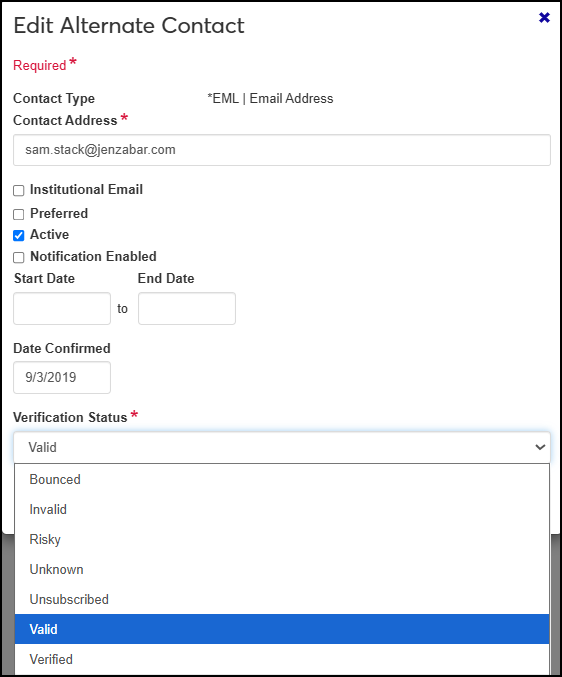
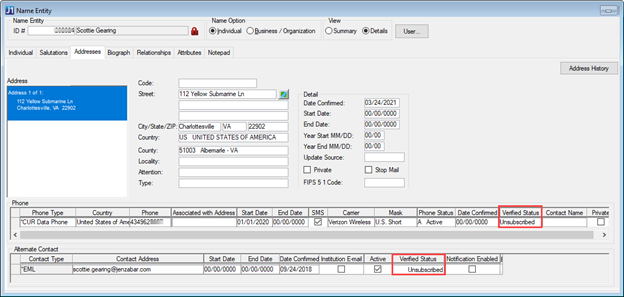
Administrators can manually change the Verified Status to Verified from:
Person Information Details page, Contact Info tab
Desktop Name Entity, Addresses tab
Opt-Out
Recipients can opt out of receiving messages at any time.
The recipient can text “CANCEL,” "END," "OPTOUT," "QUIT," "REVOKE," “STOP,” "STOPALL," or “UNSUBSCRIBE” to the number they received the text from. The system updates the Verified Status to Unsubscribed.
An administrator can manually update the Verified Status field to Unsubscribed:
Person Information Details page, Contact Info tab
Desktop Name Entity, Addresses tab
Note
Your welcome text message must include information about opt-out options. For more information, see the Texting Template help topic.
Opt Back In
Recipients can text "START" or "UNSTOP" to the same number they previously unsubscribed from. When J1 receives the request, the phone number's Verified Status changes to Verified.
Administrators can also manually change the Verified Status to Verified from:
Person Information Details page, Contact Info tab
Desktop Name Entity, Addresses tab
Record Keeping
Twilio may request proof that recipients have opted in. J1 tracks this using the Verified Status. The system records when a recipient's status changes, providing a consent record tied to that phone number or email address. Jenzabar recommends including these records in your school's record retention policy and retaining them for as long as recipients continue receiving messages, plus an appropriate time afterward.
Regulations Impacting Communications Plus Schools
In 2024, Google and Yahoo introduced requirements for bulk senders: schools and organizations sending more than 5,000 marketing messages a day must include a one-click unsubscribe option and honor unsubscribe requests within two days. Non-compliant emails risk being rejected or filtered by Gmail and Yahoo. For detailed information, see the 2024 Google and Yahoo Regulations Impacting J1 Communications Plus guide on MyJenzabar.
Recipients can unsubscribe from email messages that include an unsubscribe link. You can automatically include this link in the email during the define email interaction process by selecting the Allow Unsubscribe checkbox.
When they unsubscribe, the email address's Verified Status changes to Unsubscribed.
Administrators can also manually change the Verified Status to Unsubscribed from:
Person Information Details page, Contact Info tab
Desktop Name Entity, Addresses tab
To opt back in to receiving emails, recipients must notify your school. The appropriate personnel can manually update the Verified Status field to Verified.
Note
Preferences are maintained separately for each email address. If a recipient has multiple verified email addresses, unsubscribing one doesn't impact the other verified email addresses associated with them.
FAQ
Yes. Text messaging and email subscriptions are managed independently.
No. Each phone number maintains its own subscription status.
No. Each email address maintains its own subscription status.
If a recipient opts out with one email, but has another valid, verified email in the system, they will receive emails at that email address. If they unsubscribe all email addresses, they will not receive emails.