CBE Competency Definition Window
Use this window to define competencies for the Competency Based Education
(CBE) feature.
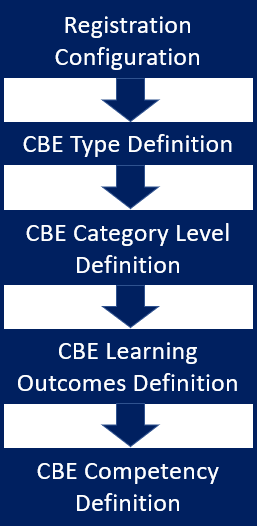
To set up Competency Based Education (CBE), you first turn it on and
configure it in the Registration Configuration window. You then define
CBE types, categories, levels, and learning outcomes. After that, you
come to this window to define the competencies themselves.
This is where you combine all the CBE elements to create competencies.
When you create a competency, you
assign it a type—either
Competency (the smallest type) or Unit (which can contain several Competencies).
You also set its maximum duration and credits, and you assign its default
maximum category level. You can select an Advising Requirement Code (ARC),
and give the competency a description to display on transcripts.
After you create a competency, you can assign learning outcomes to it.
(You created them in the CBE Learning Outcomes Definition window.)
When you finish defining competencies and assigning learning outcomes
to them, then users can begin assigning competencies to courses and sections
in J1 Web.
Be Aware of the Display Name
By default, the Competency Based Education feature's display name is
"CBE", but your school can rename it. The name appears in many
windows, pages, and drop-downs. It refers both to the Competency Based
Education feature and to the elements (like types, levels, units, and
competencies) that you assign to courses and sections.

|
The names of windows, field labels, and values
in drop-downs may include "CBE" by default. When you
change this display name, it changes those window names, field
labels, and drop-down values. In documentation, we still call
it "CBE". |
User-Defined Table
If you need to track additional information, you can use the User Defined
window to set up the tracking.
FAQ
What's
the difference between a unit and a competency?
How To
Create a Competency
Remove a Learning
Outcome from a Competency
Track Additional
Information
Related Topics
Competency Based Education
Overview
CBE Type Definition Window
CBE Category Level
Definition Window
CBE Learning Outcomes
Definition Window
User
Defined Columns, Tables, and Forms