CBE Category Level Definition Window
My Workspace | Settings - Competencies activity center
Use this window to create categories and levels that users can assign
to competencies.
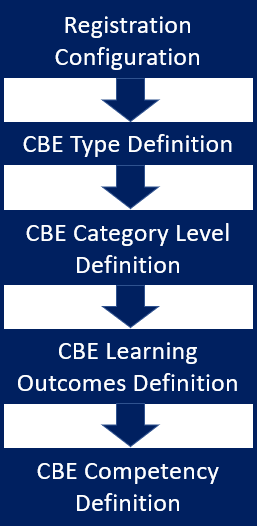
To set up Competency Based Education (CBE), you first turn it on and
configure it in the Registration Configuration window. You then define
CBE types. After that, you come to this window to create categories and
levels.
Categories can be different types of skill sets, such as knowledge and
technical ability. For each category, you can create levels of proficiency.
You can edit the Display Order of categories, and you can deselect checkboxes
to make categories and levels inactive or invisible in drop-downs where
users assign competencies to courses and sections.
Be Aware of the Display Name
By default, the Competency Based Education feature's display name is
"CBE", but your school can rename it. The name appears in many
windows, pages, and drop-downs. It refers both to the Competency Based
Education feature and to the elements (like types, levels, units, and
competencies) that you assign to courses and sections.

|
The names of windows, field labels, and values
in drop-downs may include "CBE" by default. When you
change this display name, it changes those window names, field
labels, and drop-down values. In documentation, we still call
it "CBE". |
FAQ
How To
Create and Edit
Categories and Levels
Learn More
Competency Based Education
Overview
CBE Type Definition Window
CBE Learning Outcomes
Definition Window
CBE Competency Definition
Window