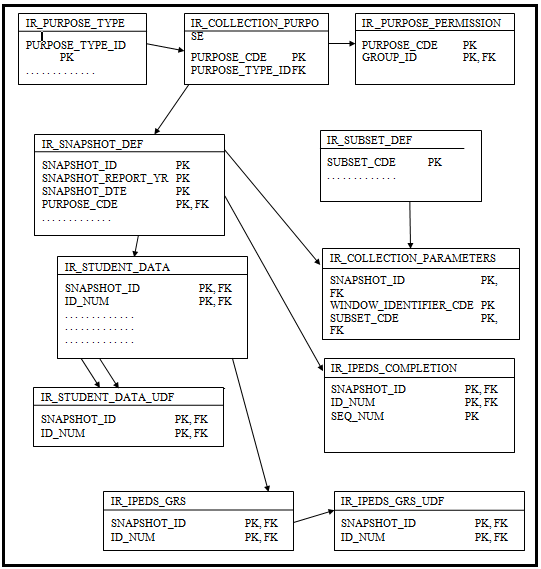
The following tables are used in the Institutional Research Reporting process to collect data for reports/snapshots.
IR_PURPOSE_TYPE
IR_COLLECTION_PURPOSE
IR_PURPOSE_PERMISSION
IR_SNAPSHOT_DEF
IR_SUBSET_DEF
IR_COLLECTION_PARAMETERS
IR_IPEDS_COMPLETION
IR_IPEDS_OUTCOME
IR_STUDENT_DATA
IR_STUDENT_DATA_UDF
IR_IPEDS_GRS
IR_IPEDS_GRS_UDF
CLUSTER_DEFINITION
Below are details of the data and source of the data collected to populate the Institutional Research Student Data tables when you click the Collect Student Data button on the Create/Work with Snapshots window.
|
For the Financial Aid IPEDS report, you should get data directly through PowerFAIDS, even though a snapshot may collect data for the IPEDS Fall Enrollment and GRS reports. |
When you are collecting data for IPEDS 12-Month Enrollment or IPEDS Fall Enrollment/GRS or you are using a Purpose Code you have defined and have selected the Enrollment radio button on the Data Collect Records Selection Method prompt, this process selects DEGREE_HISTORY rows where
STUDENT_DIV_MAST.ENTRY_DTE <= SNAPSHOT_DTE AND
STUDENT_DIV_MAST.DIV_CDE = DEGREE_HISTORY.DIV_CDE AND
DEGREE_HISTORY.DEGR_EARNED_AT = '*LOCAL' AND
DEGREE_HISTORY.ENTRY_DTE <= SNAPSHOT_DTE
|
If multiple Degree History rows are found, the one with the most recent Entry Date and Sequence Number is used. |
|
Before J1 2023.1, the process had one more parameter ("and DEGREE_HISTORY.EXIT_DTE = NULL or >= SNAPSHOT_DTE"), but it caused issues for some data, and it wasn't necessary, so it was removed in 2023.1. |
When you are collecting data for IPEDS Completions or you are using a Purpose Code you have defined and have selected the Degree radio button on the Data Collection Records Selection Method prompt, this process selects DEGREE_HISTORY rows where
STUDENT_DIV_MAST.ENTRY_DTE <= SNAPSHOT_DTE AND
STUDENT_DIV_MAST.DIV_CDE = DEGREE_HISTORY.DIV_CDE AND
DEGREE_HISTORY.DEGR_EARNED_AT = '*LOCAL' AND
DEGREE_HISTORY.ENTRY_DTE <= SNAPSHOT_DTE AND
DEGREE_HISTORY.DTE_DEGR_CONFERRED <= SNAPSHOT_DTE
|
When you use a query to select students, it is important to create a query that selects the students that have a Degree History Date Degree Conferred prior to the Report Date you are using. |
|
If multiple Degree History rows are found, the one with the most recent Date Degree Conferred and Sequence Number is used. |
Target Column Name |
Source of Data Collection Process |
SNAPSHOT_ID |
Behind-the-scenes unique identifier for the Snapshot Date you have selected in the Create/Work with Snapshots window when you clicked the Collect Student Data button. IR_SNAPSHOT_DEF.SNAPSHOT_ID passed into the Stored Procedure |
ID_NUM |
If the data was collected for an Enrollment-related report, the ID Number was most likely retrieved from selecting registrations from Student Course History. If the data was collected for a Degree-related report, the ID Number is retrieved from Degree History |
SUBSET_CDE |
Subset_cde that was selected on the Data Collection Subset window when the data was collected for this student |
CLUSTER_CDE |
Cluster is retrieved from STUDENT_MASTER.CLUSTER_CDE. You may consider using the Student Master Cluster Code as a way to select your first-time first year undergraduates and your transfer-in undergraduates. |
ACADEMIC_YR |
The J1 year code selected in the Academic Year column on the first window in the Part I Selecting Key Values (Part I of the process), Data Collection Year and Term You are not required to select a value from the drop-down list. |
ACADEMIC_TRM |
The J1 term code selected in the Academic Term column on the first window in Selecting Key Values part (Part I) of the process, Data Collection Year and Term You are not required to select a value from the drop-down list. |
GRS_COHORT_CDE |
If a student is being flagged or selected as a First-Time in Postsecondary Education student, Full Time Undergraduate student, the student's record is stamped with the COHORT_CDE selected in the First Time Freshmen Parameters window. If the student's data in IR_STUDENT_DATA does not match the identified criteria, then the Cohort column is blank. |
LOC_CDE |
Location is retrieved from STUDENT_MASTER.LOC_CDE |
DIV_CDE |
Division is retrieved from STUDENT_DIV_MAST.DIV_CDE. To determine which row to use, we check dates on DIVISION_MASTER and the snapshot date. |
INSTITUTIONAL_DIV |
On the Degree History row that is the current degree, the logic looks for a value in the following order:
If no rows are retrieved, the column is null. |
GRP_REG_CDE |
Group Registration Code is retrieved from STUDENT_MASTER.GRP_REG_CDE |
CLASS_CDE |
Class Code is retrieved from STUDENT_MASTER.CURRENT_CLASS_CDE |
DEGR_SEEKING |
The Degree Seeking value is retrieved from the DEGREE_HISTORY.NON_DEGREE_SEEKING column. This column has opposite values from the Non-Degree Seeking checkbox on the Degree subtab on the Degree tab.
If a DEGREE_HISTORY row cannot be found, the column is blank. |
AWARD_LEVEL |
The Award Level value is retrieved from the Degree Definition table for the Degree found on the Degree tab on the Student Information window. Rows with Award Levels 9, 10, or 11 are not selected since those are Award Levels no longer used for IPEDS reporting. |
DISTANCE_ED_STATUS |
Match all STUDENT_CRS_HIST rows for the ID_NUM with corresponding SECTION_MASTER rows:
|
BACHELOR_DEGREE |
If the selected AWARD_LEVEL above retrieved from the Degree Definition table for the selected Degree History record is '5 (Bachelor's Degree)', this column is set to 'Y'. If the selected AWARD_LEVEL is not equal to '5', this column is set to 'N'. |
PT_FT |
This column is populated only if you have selected a Purpose with a Purpose Type ID of IPEDS Fall Enrollment/GRS or IPEDS 12-Month or you have selected the Enrollment radio button on the Data Collection Records Selection Method window. If the student has the STUDENT_TERM_SUM.PT_FT_STS = 'F' in any of the selected terms, the PT_FT column in the IR_STUDENT_DATA table to is set to 'F'. If the student has 'P' in any of the selected terms, the PT_FT column is set to 'P', The PT_FT column is set to NULL for all other values. |
FIRST_TIME_IN_POSTSEC_SCHL |
This flag is set to 'Y' only when the FR_COHORT_CDE parameter is provided. See the GRS_COHORT_CDE column for details on how this column is set to 'Y' or how this column is set to 'Y' at the same time the GRS_COHORT_CDE is updated. On the First-Time Freshmen Parameters prompt:
|
CUR_DEGR_ENTRY_DTE |
The Entry Date value is retrieved from the Entry Date column on the Degree tab (DEGREE_HISTORY.ENTRY_DTE) on the Student Information window. If no date exists or row cannot be found, this column is set to NULL. |
CUR_DEGR_CDE |
The Degree value is retrieved from the Degree column on the Degree tab (DEGREE_HISTORY.DEGR_CDE) on the Student Information window. If no code is selected or row is found, this column is NULL. |
MAJOR_1 |
The Major 1 value is retrieved from the Major 1 column on the Degree Programs subtab on the Degree tab (DEGREE_HISTORY.MAJOR_1) on the Student Information window. |
MINOR_1 |
The Minor 1 value is retrieved from the Minor 1 column on the Degree Programs subtab on the Degree tab (DEGREE_HISTORY.MINOR_1) on the Student Information window. |
CERTIFICATION_1 |
The Certification 1 value is retrieved from the Certification 1 column on the Degree Programs subtab on the Degree tab (DEGREE_HISTORY.CERTIFICATION_1) on the Student Information window. |
CONCENTRATION_1 |
The Concentration 1 value is retrieved from the Concentration 1 column on the Degree Programs subtab on the Degree tab (DEGREE_HISTORY.CONCENTRATION_1) on the Student Information window. |
ETHNICITY_RACE |
The Ethnicity/Race value is retrieved from the IPEDS column (ipeds_report_value) in the student's most recent row on the Student Information (or Name Entity) window, Biograph tab, Ethnic/Race subtab. For students with Citizenship Status of Nonresident Alien:
|
DECLARED_GENDER |
The Declared Gender is calculated from the Biograph Gender value.
???If you select Can Report Other Gender, the counts of Other and Unknown are taken from the Sex at Birth field and the student's division (student_master.cur_stud_div) and placed in a separate part of the report. If you don't select Can Report Other Gender, the system enters -2 in the appropriate report fields. |
BIOGRAPH_GENDER |
The Biograph Gender column is prepopulated by the Student Information window, Biograph tab, Master subtab, Sex at Birth column (biograph_master.gender). |
US_CITIZEN |
The US Citizen value is derived by comparing the value of the Citizen of value on the Biograph tab (BIOGRAPH_MASTER.CITIZEN_OF) on the Student Information window against the Citizen of value on the IPEDS Configuration window (IPEDS_CONFIG.IPEDS_CITIZEN_VALUE). If the two values are equal, the value US Citizen checkbox is selected (Y). |
AGE |
The Age column is derived by determining the number of days between the Snapshot Date and the student's Birth Date on the Biograph tab (BIOGRAPH_MASTER.BIRTH_DATE) on the Student Information window, dividing the number of days by 365.25 to determine the number of years of age, and rounding down to the nearest whole year. If BIOGRAPH_MASTER.BIRTH_DATE is empty, this value is 0. |
RELIGION |
The Religion value is retrieved from the Religion column on the Biograph tab (BIOGRAPH_MASTER.RELIGION) on the Student Information window. |
PERMANENT_CITY |
The Permanent Address columns come from the first address that is retrieved from the Address tab on the Student Information window based on the selected Permanent Address Priority Address Priority list. If the user has not selected an Address Priority list, then the system looks for a *LHP address. The Permanent City value is retrieved from the City column on the Address tab (AddressMaster.CITY) on the Student Information window. If no parameter value is provided, this column is populated with AddressMaster.CITY where ADDR_CDE = '*LHP'. |
PERMANENT_COUNTY |
The Permanent Address columns come from the first address that is retrieved from the Address tab on the Student Information window based on the selected Permanent Address Priority Address Priority list. If the user has not selected an Address Priority list, then the system looks for a *LHP address. The Permanent County value is retrieved from the County column on the Address tab (AddressMaster.COUNTY) on the Student Information window. If no parameter value is provided, this column is populated with AddressMaster.COUNTY where ADDR_CDE = '*LHP'. |
PERMANENT_STATE |
The Permanent Address columns come from the first address that is retrieved from the Address tab on the Student Information window based on the selected Permanent Address Priority Address Priority list. If the user has not selected an Address Priority list, then the system looks for a *LHP address. The Permanent State value is retrieved from the State column on the Address tab (AddressMaster.STATE) on the Student Information window. If no parameter value is provided, this column is populated with AddressMaster.STATE where ADDR_CDE = '*LHP'. |
PERMANENT_ZIP |
The Permanent Address columns come from the first address that is retrieved from the Address tab on the Student Information window based on the selected Permanent Address Priority Address Priority list. If the user has not selected an Address Priority list, then the system looks for a *LHP address. The Permanent ZIP value is retrieved from the ZIP column on the Address tab (AddressMaster.ZIP) on the Student Information window. If no parameter value is provided, this column is populated with AddressMaster.ZIP where ADDR_CDE = '*LHP'. |
LOCAL_CITY |
The Local Address columns come from the first address that is retrieved from the Address tab on the Student Information window based on the selected Local Address Priority Address Priority list. The Local City value is retrieved from the City column on the Address tab (AddressMaster.CITY) on the Student Information window. |
LOCAL_COUNTY |
The Local Address columns come from the first address that is retrieved from the Address tab on the Student Information window based on the selected Local Address Priority Address Priority list. The Local County value is retrieved from the County column on the Address tab (AddressMaster.COUNTY) on the Student Information window. |
LOCAL_STATE |
The Local Address columns come from the first address that is retrieved from the Address tab on the Student Information window based on the selected Local Address Priority Address Priority list. The Local State value is retrieved from the State column on the Address tab (AddressMaster.STATE) on the Student Information window. |
LOCAL_ZIP |
The Local Address columns come from the first address that is retrieved from the Address tab on the Student Information window based on the selected Local Address Priority Address Priority list. The Local ZIP value is retrieved from the ZIP column on the Address tab (AddressMaster.ZIP) on the Student Information window. |
TOTAL_HRS_ENROLLED |
This column is populated only if you have selected a Purpose with a Purpose Type ID of IPEDS Fall Enrollment/GRS or IPEDS 12-Month or you have selected the Enrollment radio button on the Data Collection Records Selection Method window. Student Course History records are selected based on Years and Term you selected or the Course Date Range you selected in the Record Selection window. For the selected Student Course History records that have a TRANSACTION_STATUS = 'H', 'P', 'C', and 'R', the STUDENT_CRS_HIST.CREDIT_HRS and STUDENT_CRS_HIST.CRS_CLOCK_HRS are collected for all IDs in this Snapshot Subset and calculated as described below. · For Credit Hours the IPEDS Type on the Credits box in the Courses window = ???Credit Hours??? (SECTION_MASTER.IPEDS_HOUR_TYPE = 'C'). · For Clock Hours the IPEDS Type on the Credits box in the Courses window = ???Clock Hours??? (SECTION_MASTER.IPEDS_HOUR_TYPE = 'L'). If the Purpose has a Purpose Type ID of IPEDS 12 Month Enrollment, the Total Hours are the sum of the calculated Credit Hours. The Credit Hours for the selected Student Course History records are multiplied by the percentage of the days that the course meets that fall within the selected 12-Month date range. If the Purpose has a Purpose Type ID of IPEDS Fall Enrollment/GRS or if you have selected the Enrollment radio button on the Data Collection Records Selection Method window, the Total Hours are the sum of the Credit Hours for the selected Student Course History records. |
TOTAL_HRS_PREREG |
This column is the sum of Credit Hours for the selected Student Course History Records with a Transaction Status of Preregistered. These hours are not calculated if the Purpose is for 12 Month Enrollment. |
TOTAL_HRS_RESERVED |
This column is the sum of Credit Hours for the selected Student Course History Records with a Transaction Status of Reserved. These hours are not calculated if the Purpose is for 12 Month Enrollment. |
TOTAL_HRS_REGISTERED |
This column is the sum of Credit Hours for the selected Student Course History Records with a Transaction Status of Current. These hours are not calculated if the Purpose is for 12 Month Enrollment. |
TOTAL_HRS_HISTORY |
This column is the sum of Credit Hours for the selected Student Course History Records with a Transaction Status of Current. These hours are not calculated if the Purpose is for 12 Month Enrollment. |
TOTAL_CLOCK_HRS_ENROLLED |
This column is populated only if you have selected a Purpose with a Purpose Type ID of IPEDS Fall Enrollment/GRS or IPEDS 12-Month or you have selected the Enrollment radio button on the Data Collection Records Selection Method window. Student Course History records are selected based on Years and Term you selected or the Course Date Range you selected in the Record Selection window. For the selected Student Course History records that have a TRANSACTION_STATUS = 'H', 'P', 'C', and 'R', the STUDENT_CRS_HIST.CREDIT_HRS and STUDENT_CRS_HIST.CRS_CLOCK_HRS are collected for all IDs in this Snapshot Subset and calculated as described below. · For Credit Hours, the IPEDS Type on the Credits box in the Courses window = ???Credit Hours??? (SECTION_MASTER.IPEDS_HOUR_TYPE = 'C'). · For Clock Hours, the IPEDS Type on the Credits box in the Courses window = ???Clock Hours??? (SECTION_MASTER.IPEDS_HOUR_TYPE = 'L'). If the Purpose has a Purpose Type ID of IPEDS 12 Month Enrollment, the Total Clock Hours are the sum of the calculated Clock Hours. The Clock Hours for the selected Student Course History records are multiplied by the percentage of the days that the course meets that fall within the selected 12-Month date range. If the Purpose has a Purpose Type ID of IPEDS Fall Enrollment/GRS or if you have selected the Enrollment radio button on the Data Collection Records Selection Method window, the Total Hours are the sum of the Clock Hours. |
TOTAL_CLOCK_HRS_PREREG |
This column is the sum of the Clock Hours for the selected Student Course History Records with a Transaction Status of Preregistered. These hours are not calculated if the Purpose is for 12 Month Enrollment. |
TOTAL_ CLOCK_HRS_RESERVED |
This column is the sum of the Clock Hours for the selected Student Course History Records with a Transaction Status of Reserved. These hours are not calculated if the Purpose is for 12 Month Enrollment. |
TOTAL_ CLOCK_HRS_REGISTERED |
This column is the sum, of the Clock Hours for the selected Student Course History Records with a Transaction Status of Current. These hours are not calculated if the Purpose is for 12 Month Enrollment |
TOTAL_ CLOCK_HRS_HISTORY |
This column is the sum of the Clock Hours for the selected Student Course History Records with a Transaction Status of Current. These hours are not calculated if the Purpose is for 12 Month Enrollment. |
CUR_CANDIDACY_TYPE |
The Candidacy Type column is retrieved from the Current Candidacy row if the Candidacy Year and Term is the same as the Registration Configuration Current Year and Term (CANDIDACY_TYPE). |
CUR_CANDIDACY_STAGE |
The Candidacy Stage column is retrieved from the Current Candidacy row if the Candidacy Year and Term is the same as the Registration Configuration Current Year and Term (CANDIDACY_STAGE). |
LAST_TRANSFER_SCHOOL |
The Transfer School is retrieved from the Candidate tab of the Maintain Candidacy window if the Organization has neither an Organization Type nor a School Type that is not equal to 'HS' (LAST_ORG_ATTENDED). |
HIGH_SCHOOL |
The High School is retrieved from the Candidate tab of the Maintain Candidacy window if the Organization has either an Organization Type or a School Type that is equal to 'HS' (HIGH_SCHOOL). |
HIGH_SCHOOL_GPA |
The High School GPA is retrieved from the Admissions Org Tracking row for the High School selected in the previous column (AD_ORG_TRACKING.GPA) |
SAT_ACT_HIGHEST_SCORE |
The SAT/ACT score is the highest SAT/ACT score retrieved from the Highest Test Core column for the Test Score Element is *BEST (HIGHEST_TEST_SCORE.HIGHEST_TST_SCORE). |
TRANSFER_IN |
The Transfer-In column is retrieved using similar logic as that of the First-Time logic (STUDENT_DIV_MASTER.TRANSFER_IN is a column that may be used in determining if the student is Transferred-In). |
ENTRANCE_YR |
The Entrance Year is retrieved from the Entrance Year column on the Student tab (STUDENT_MASTER.ENTRANCE_YR) on the Student Information window. |
ENTRANCE_TRM |
The Entrance Term is retrieved from the Entrance Term column on the Student tab (STUDENT_MASTER.ENTRANCE_TRM) on the Student Information window. |
CIP_CDE |
The CIP Code is retrieved based on the Degree History Major 1 value (MAJOR_MINOR_DEF.CIP_CDE for the selected Major) or from Certification 1 (CERTIFICATION_DEF.CIP_CDE for the selected Certification) if there is no value in Major 1. |
HONORS_PROG_CDE |
The Honors Program column is retrieved from the Honors Program column on the Graduation subtab of the Degree tab (DEGREE_HISTORY.HONORS_PROGRAM) on the Student Information window. |
DEGREE_CONFERRED_DTE |
The Degree Date column is retrieved from the Date Conferred column on the Degree subtab of the Degree tab (DEGREE_HISTORY.DTE_DEGR_CONFERRED) on the Student Information window. |
DEGREE_CUM_GPA |
The Degree GPA column is retrieved from the Career GPA (STUD_TERM_SUM_DIV.CAREER_GPA) from Student Term Summary by Division for the Current Division on Student Master (STUDENT_MASTER.CUR_STUD_DIV) and for the Graduation Year and Graduation Term (DEGREE_HISTORY.DEGREE_YR, DEGREE_HISTORY.DEGREE_TRM). |
ACADEMIC_STANDING |
If the Probation column on the Student tab on the Student Information window has a value, that value is retrieved (STUDENT_MASTER.CUR_ACAD_PROBATION). If it does not have a value and if the Honors column on the Student tab on the Student Information window has a value, that value is retrieved (STUDENT_MASTER.CUR_ACAD_HONORS). |
EXIT_REASON |
The Exit Reason column is retrieved from the Exit Reason column on the Degree History tab (DEGREE_HISTORY.EXIT_REASON) on the Student Information window. The value stored here is the Alternate Value 1 value on Table Detail (_exit_reason_view.tbl_value_alt1). |
EXIT_GOODSTANDING |
This column is updated to 'Y' if the value selected for EXIT_REASON above has TABLE_DETAIL.TBL_VALUE_ALT1 equal to one of the following: '01', '02', '03', '04', '05', '06', '07', '08', '09', '10'. This column is updated to 'N' if the value selected for EXIT_REASON above has TABLE_DETAIL.TBL_VALUE_ALT1 not equal to one of the following: '01', '02', '03', '04', '05', '06', '07', '08', '09', '10'. IF no value was selected for EXIT_REASON above, this EXIT_GOODSTANDING is NULL. |
DORM_BLDG_CDE |
The Dorm column is retrieved from the Room Assignment tab of the Residence Information window in Student Life module (ROOM_ASSIGN.BLDG_CDE) for the current Student Life Session. |
TUITION_TYPE |
The Tuition column is retrieved from the Tuition column on the Student tab (STUDENT_MASTER.TUITION_CDE) on the Student Information window. |
TOTAL_FEDERAL_AID |
The following Financial Aid data summaries (Total Federal Aid, Total Institutional Aid, Total State Aid, Total Other Aid) are obtained by summing specific data elements from the PowerFAIDS view named v_disb_poe_summary when an SSN match between the J1 student and PowerFAIDS student is made. This view contains information about all financial aid awards and disbursements by period of enrollment (POE). Federal Aid includes any funds defined in PowerFAIDS as a grant with a donor source of Federal. It does not include loan or work study funds. |
TOTAL_INSTITUTIONAL_AID |
Institutional Aid includes any funds defined in PowerFAIDS as a grant with a donor source of Institutional. A grant includes funds defined as grants or scholarships. No loans or work study fund awards are included. |
TOTAL_STATE_AID |
State Aid includes any funds defined in PowerFAIDS as a grant with a donor source of State. |
TOTAL_OTHER_AID |
Other Aid includes any funds defined in PowerFAIDS as a grant with a donor source of Other |
TOTAL_PRIVATE_AID |
Other Aid includes any funds defined in PowerFAIDS as a grant with a donor source of Private. For each of these aid types, users are asked to designate what aid to include in the calculated total. · If Pending is the only option selected, then all aid that has been awarded to a student but not accepted by a student is counted for the selected POEs or Award Year. · If Accepted is the only option selected, then all aid that has been awarded to a student and accepted by a student is counted for the selected POEs or Award Year. · If both Pending and Accepted are selected, then all aid awarded to a student is counted for the selected POEs or Award Year. · If Disbursed is the only option selected, then all aid that has been disbursed to a student is counted for the selected POEs or Award Year. |
TOTAL_TUITION |
The Tuition column is retrieved as a SUM of Transaction Amount from Transaction History (TRANS_HIST.TRANS_AMT) for the Years and Terms and Tuition Charge Codes and Tuition Miscellaneous Codes (TRANS_HIST.CHG_FEE_CDE, TRANS_HIST.AR_CDE) selected in the Tuition and Fees Parameter window. It is assumed that the Subsidiary Code is 'AR' (TRANS_HIST.SUBSID_CDE). Both Preliminary and Actual charges are retrieved. |
TOTAL_FEES |
The Fees column is retrieved as a SUM of Transaction Amount from Transaction History (TRANS_HIST.TRANS_AMT) for the Years and Terms and Fees Charge Codes and Fees Miscellaneous Codes (TRANS_HIST.CHG_FEE_CDE) selected in the Tuition and Fees Parameter window. It is assumed that the Subsidiary Code is 'AR' (TRANS_HIST.SUBSID_CDE). Both Preliminary and Actual charges are retrieved. |
INCLUDE_IN_IPEDS |
This column is updated to 'Y' if the Snapshot's PURPOSE_CDE has any of the IPEDS flags set to 'Y'. This column is updated to 'N' if the Snapshot's PURPOSE_CDE has any of the IPEDS flags set to something other than 'Y'. |
IPEDS_DIV_CDE |
The IPEDS Division is retrieved from Division Definition (DIVISION_DEF.IPEDS_DIV_CDE) for the Student's Current Division on the Student tab of the Student Information window (STUDENT_MASTER.CUR_STUD_DIV). |
IPEDS_HS_GRAD_12_MONTHS |
The HS Grad in last 12 Months is calculated from the Org Tracking End Date (ORG_TRACKING.END_DTE) on the Org Tracking tab of the Org Tracking for Student window for the row that has the same Org Code as the High School column on the Candidate tab on the Maintain Candidacy window (CANDIDATE.HIGH_SCHOOL). The system calculates the number of days between the Candidate High School End Date (ORG_TRACKING.END_DTE) and the Snapshot date: if > 365, the column is set to 'N'; if < 366, 'Y'; any other value, 'N'. |
IPEDS_STAND_ALONE_GRAD_PROG |
The IPEDS Stand Alone Grad Program is retrieved from the Stand-Alone Grad checkbox on the CIP Definition window for the student's CIP code on this row. |
USER_NAME |
LOGGED IN USER |
JOB_NAME |
IR Data Collection |
JOB_TIME |
Datetime stamp |
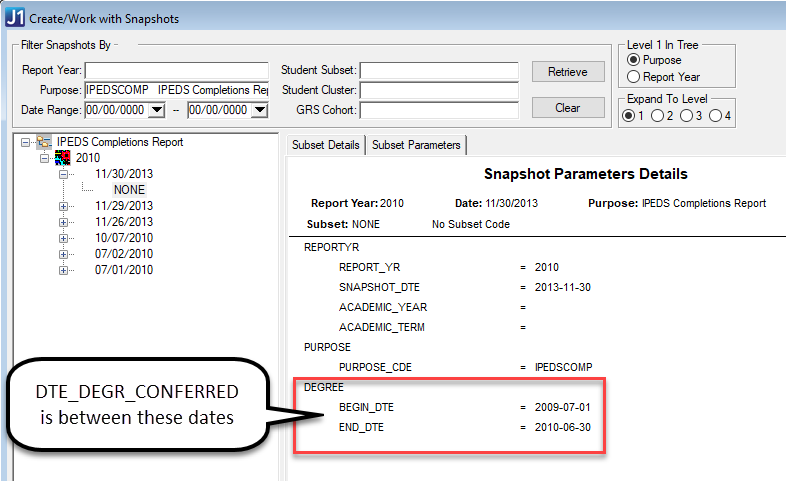
Since students may complete more than one Major or Certification within the date range for reporting Completions to IPEDS, a row is created in IR_IPEDS_COMPLETIONS for each completed Major or Certification.
The Collect Student Data process selects DEGREE_HISTORY rows where
NON_DEGREE_SEEKING = 'N' and
DEGR_EARNED_AT = '*LOCAL' and
DTE_DEGR_CONFERRED is between Begin and End dates of the snapshot
Target Column Name |
Source TABLE.COLUMN |
Comment |
SNAPSHOT_ID |
IR_STUDENT_DATA |
The IR_IPEDS_COMPLETIONS.SNAPSHOT_ID = IR_STUDENT_DATA.SNAPSHOT_ID for this set of data. |
ID_NUM |
DEGREE_HISTORY.ID_NUM |
The IR_IPEDS_COMPLETIONS.ID_NUM = IR_STUDENT_DATA.ID_NUM for this set of data. |
SEQ_NUM |
|
The Collect Student Data process generates the next SEQ_NUM for the student currently being processed. The SEQ_NUM are per ID_NUM in the table (IR_IPEDS_COMPLETION.SEQ_NUM). |
DEGREE |
DEGREE_HISTORY.DEGR_CDE |
The Degree (DEGREE_HISTORY.DEGR_CDE) from the selected DEGREE_HISTORY row is used. |
IPEDS_DIV_CDE |
DEGREE_HISTORY.DIV_CDE |
The Degree History Division (DEGREE_HISTORY.DIV_CDE) is used to select the correct IPEDS Division based on the mapped IPEDS Division on the Division Definition window. Note that First Professional is no longer a valid IPEDS Division. |
IPEDS_CIP_CDE |
MAJOR_MINOR_DEF.CIP_CDE |
J1 retrieves the CIP Code for the selected Major 1-4 or Certification 1-4 retrieved from MAJOR_MINOR_DEF or CERTIFICATION_DEF. |
IPEDS_CIP_COMP_DTE |
DEGREE_HISTORY.DTE_DEGR_CONFERRED |
The Date Conferred (DEGREE_HISTORY.DTE_DEGR_CONFERRED) from the selected DEGREE_HISTORY row is used to update the CIP Completion Date. |
IPEDS_AWARD_LEVEL |
CIP_AWARD_LEVE.IPEDS_AWARD_LEVEL or DEGREE_DEFINITION.IPEDS_AWARD_LEVEL |
The Major or Certification from the selected DEGREE_HISTORY row is used to select the correct Award Level for the IPEDS_CIP_CDE on the currently processed row. The process looks first for an award level in CIP_AWARD_LEVEL. If none is found there, then if IPEDS_PRIMARY = 'Y' for the currently processed row, it looks for an award level in DEGREE_DEFINITION for the DEGREE on the currently processed row. |
IPEDS_PRIMARY |
DEGREE_HISTORY.MAJOR_1 DEGREE_HISTORY.MAJOR_2 DEGREE_HISTORY.MAJOR_3 DEGREE_HISTORY.CERTIFICATION_1 DEGREE_HISTORY.CERTIFICATION_2 DEGREE_HISTORY.CERTIFICATION_3 |
If a Major 1 (DEGREE_HISTORY.MAJOR_1) is found on the selected DEGREE_HISTORY row, the Primary column is selected; or if no Major 1 is found but a Certification 1 (DEGREE_HISTORY.CERTIFICATION_1) is found, then the Primary column is selected. If a student has more than one DEGREE_HISTORY row that meets the criteria noted in the previous paragraph, that student will have multiple Primary Majors/Certifications on this tab that will be counted in Part A. If more than one major or certification is listed on the same selected DEGREE_HISTORY row, then a second row is created but the Primary column is cleared and the row is counted in Part B. |
DISTANCE_ED_STATUS
|
SECTION_MASTER.DISTANCE_EDUCATION |
Match all STUDENT_CRS_HIST rows for the ID_NUM with corresponding SECTION_MASTER rows: · If all SECTION_MASTER.DISTANCE_EDUCATION = 'Y', this column is set to 'E' (Exclusively Distance Education. · If at least one but not all SECTION_MASTER.DISTANCE_EDUCATION = 'Y', this column is set to 'S' (Some Distance Education Courses). · If all SECTION_MASTER.DISTANCE_EDUCATION = 'N', this column is set to 'N' (No Distance Education Courses). |
Rows are inserted in IR_IPEDS_GRS for all students in the selected Snapshot using this select:
SELECT ir_student_data.id_num
FROM ir_student_data
WHERE ( ir_student_data.ipeds_div_cde = 'U' ) AND
( ir_student_data.degr_seeking = 'Y' ) AND
( ir_student_data.pt_ft = 'F' ) AND
( ir_student_data.first_time_in_postsec_schl = 'Y' ) AND
( ir_student_data.transfer_in = 'N' ) AND
( ir_student_data.include_in_ipeds = 'Y' ) AND
( ir_student_data.snapshot_id = the currently selected snapshot_id)
Then the process gets one DEGREE_HISTORY row to use where
DEGR_EARNED_AT = ???*LOCAL'
AND
DEGREE_HISTORY.DIV_CDE = a division for which DIVISION_DEF.IPEDS_DIV_CDE = ???U'
Rows are selected where
DTE_DEGR_CONFERRED IS NOT NULL (getting the row with the latest DTE_DEGR_CONFERRED)
AND
DTE_DEGR_CONFERRED IS NULL getting the row with the earliest ENTRY_DTE within the 6 year or 3 year date range.
Target Column Name |
Source TABLE.COLUMN |
Comment |
SNAPSHOT_ID |
|
This is the behind-the-scenes unique identifier for the Snapshot Date you have selected in the Create/Work with Snapshots window when you clicked the Collect Student Data button. IR_SNAPSHOT_DEF.SNAPSHOT_ID passed into the Stored Procedure. |
ID_NUM |
IR_STUDENT_DATA.ID_NUM |
This is the ID Number of the student currently being processed that was reported in the IPEDS Fall Enrollment report as an Undergraduate, Full Time, First Time in Postsecondary Education, Degree Seeking and Transfer in = N students. |
GRS_FINAL_PROGRAM |
DEGREE_HISTORY.MAJOR_1or CERTIFICATION_1 |
Final Program comes from the first value in the Major 1-4 columns of the selected DEGREE_HISTORY row. If there is no major, then the process checks Certification 1-4 for a value. If no value is found, then Final Program is NULL. |
GRS_NORMAL_YEARS |
CIP_AWARD_LEVEL. MON_NORM_COMPLETE |
For the Final Program, the process gets the Normal Years to complete from the CIP Award Level tab and divides the number by 12. The process may retrieve an Award Level from the Degree Definition window for that student's Degree from the selected Degree History row. |
GRS_ACTUAL_YEARS |
DEGREE_HISTORY.DTE_DEGR_CONFERRED and STUDENT_DIV_MAST.ENTRY_DTE |
For Actual Years to Complete, the process uses the Date Conferred on the selected Degree History row. The total number of days between the Student Division Master Entry Date and the Date Conferred is divided by 365.25. |
GRS_COMPLETION_STS |
|
The Completion Status is populated by the GRS Process. If the student has a Final Program and both Actual Years and Normal years are greater than zero and if Actual Years is less than or equal to 1 times the Normal Years, then the Status is ???H??? (Completed in 100% of Normal Time). If Actual Years is greater than 1 but less than or equal to 1.5 times the Normal Years, then the Status is ???N??? (Completed in 150% of Normal Time). ELSE Status = 'O' If the above is not true, then the process checks if the student has registrations (???P', ???C' or ???H' for any of the years and terms selected in the in the prompt). If ???Yes,' then Completion Status = ???E' (Non-completer, Still Enrolled). If none of the above, then the Completion Status = ???X ' (Non-completer, Not Enrolled). |
GRS_EXIT_REASON |
DEGREE_HISTORY.EXIT_REASON |
If the Exit Reason Date is filled with a date within the range of 09/01/xxxx less 6 years if G1 or 3 years if G2 or G3 and Exit Reason is populated, the value is gotten from Table Detail Alternate Value 1. |
GRS_USER_GENERATED |
The date the process is run. |
|
GR200_COMPLETION_STATUS |
|
The GR200 Completion Status is populated by the GR200 Process. If the student has a Final Program and both Actual Years and Normal years are greater than zero and if Actual Years is greater than 1.5 but less than or equal to 2 times the Normal Years, then the Status is ???T??? (200% Completer). If the above is not true, then the process checks if the student has registrations (???P', ???C' or ???H' for any of the years and terms selected in the in the Current Academic Term box on the Create/Work with Snapshots window (Graduation Rate Survey subtab on the Additional IPEDS Data tab). If ???Yes,' then Completion Status = ???E' (Non-completer, Still Enrolled). |
GR200_EXIT_REASON |
|
For Forms G21: Exit Reason Date is filled with a date between 08/31/REPORTYR-2 years and 08/31/REPORT YEAR. For Forms G22: Exit Reason Date is filled with a date between 08/31/REPORTYR-1 and 08/31/REPORT YEAR. And If the GRS value is one of the following, then the value is gotten from Table Detail Alternate Value 1: · 04 Deceased or Disabled · 05 Left to Serve in Armed Forces · 06 Left to Serve in Foreign Service · 07 Left to Serve in Church Missions · 10 Graduated |
GR200_USER_GENERATED |
|
Stamped with the current user when the process is run. |
GR200_DTE_GENERATED |
|
The date the process is run. |
