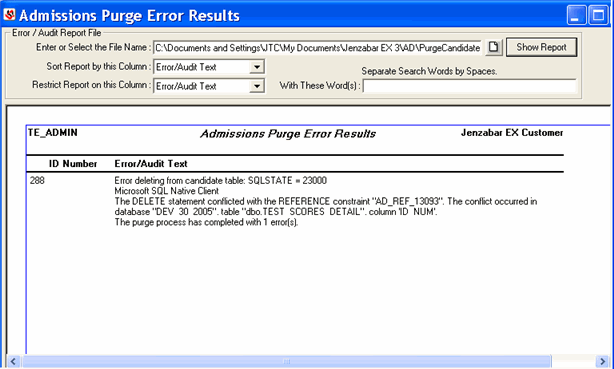
This window displays the Admissions Purge Error Results report at the end of the Purge Candidate process or if you navigate to a different report location and click the Show Report button.
The report lists unsuccessful ID Numbers in the purge along with an error message for each unsuccessful ID Number. If the Purge process was successful, the report displays a message that the process was successful.
The Error/Audit Report File group box allows you to view a difference report and/or manipulate the data displayed on the Admissions Purge Error Results report.
Enter or Select the File Name |
You can
enter the path to a report or click the
|
Sort Report by this Column |
Thee report only has two columns, ID Number and Error/Audit Text. Sorting on the ID Number column lists the ID Numbers numerically; sorting on the Error/Audit Text column lists the text lines alphabetically using the first word in each line.
|
Restrict Report on this Column and With these Word(s) |
These two filtering columns are used to show only what you want to see. The only column on which you can restrict text is the Error/Audit Text column. When you select this column and then enter word(s) to be matched in the With these Word(s) column, the report displays text that matches and is related to the word(s) entered. |
 icon to open the Select File window to select the text file to
display. You can then click the
icon to open the Select File window to select the text file to
display. You can then click the