State Reporting is available for licensed institutions in a limited number of states. Currently there is some level of state reporting available for Texas, Oklahoma, and Arkansas. To accommodate these reports, various J1 Desktop windows have been modified, with options and fields added as needed. If your institution is licensed for state reporting, you will find some helpful information in the context-sensitive help for J1 Desktop windows. Access this help by pressing F1. If your institution is not licensed for state reporting, these items may not visible or accessible for you, although they will be mentioned in Help topics associated with the window.
For the most current and complete resources, visit the State Reporting Resource Center on MyJenzabar.net, where you will find step-by-step guides for setting up and generating state reports.
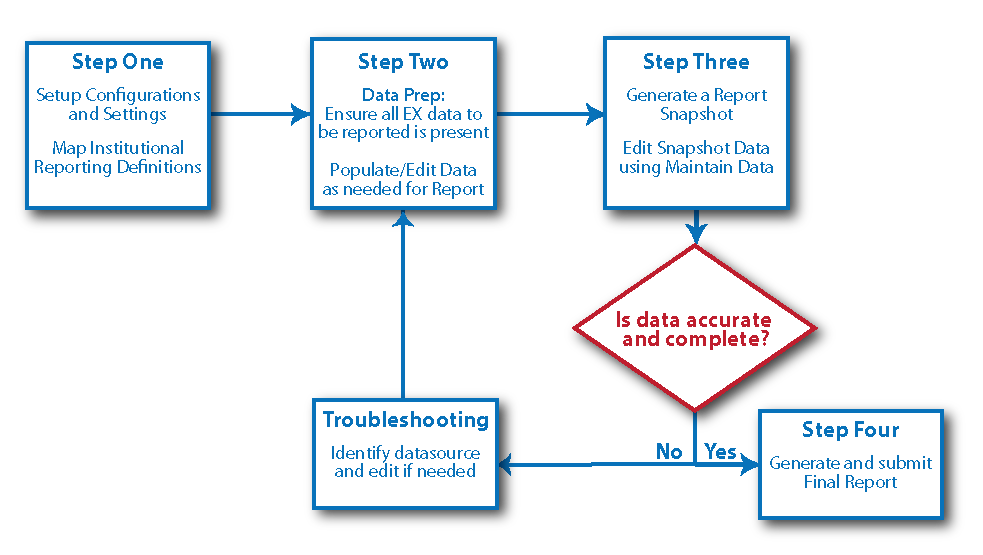
There are four main tasks for generating state reports.
· Set up configurations
To collect the appropriate data, enter and verify configurations and settings
on various J1 Desktop windows. Mapping the Institutional Reporting Definitions
should be one of the first steps. This will only need to be done the first
time you run the report.
· Confirm Data
Next you will need to review your J1 data carefully to ensure that the
data needed for the report is populated, current, and correct.
· Generate a report
snapshot
This provides a preview of the information collected for the report. You
can evaluate the snapshot data to ensure it is complete and fix anything
that is missing or inaccurate. Some data required for the report is not
available in J1 Desktop; these fields must be edited during this step,
using the Maintain Snapshot Data tool. If necessary, you may also need
to go back and correct the data where it normally lives in J1 Desktop
and then recollect the report data. Repeat this process of checking and
correcting until you feel the report data is accurate. (See graphic below.)
· Generate and submit the final report