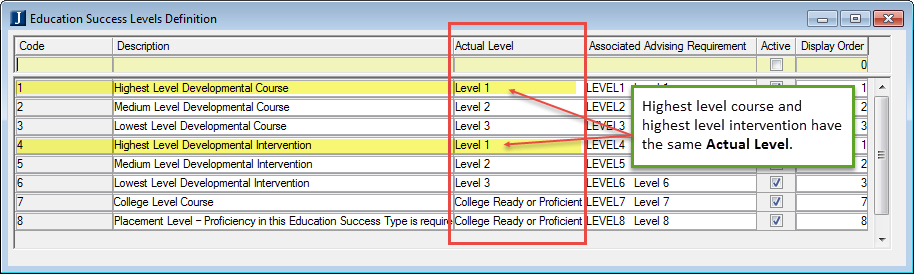
Use this window to view and update definitions. You can activate or deactivate items, change the display order, and add, insert, or delete rows.
You can create or edit codes and descriptions to suit your program. For example, you might create levels for courses, and then create parallel levels for interventions.
Assign an Actual Level to each code. The Actual Level is what registration looks at to make sure the student has achieved the appropriate level to register for a particular course.
Because registration checks the Actual Level, you can name codes and descriptions however you need to for reporting purposes. If you need to distinguish between levels achieved by courses and levels achieved by testing or other interventions, you can do that in the codes and descriptions.
In the example below, the highest level intervention has the same Actual Level as the highest level course, although they have different codes and descriptions.
The default Actual Level is ‘College Ready or Proficient in this Education Success Type’.
Set up Education Success requirements on the Registration Configuration window | Configuration Table tab.
For each level, create an Associated Advising Requirement to use in Institutional Requirement Trees.