You can systematically store and retrieve documents such as transcripts, instructions, and agenda documents. This system is designed for documents with a relatively long shelf-life such as transcripts. It is not intended for more transient documents such as feedback comments or attachments to requisitions.
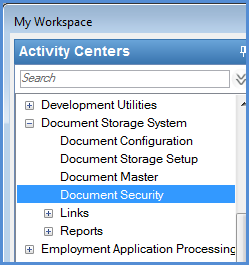
The Document Storage System activity center is the gateway that links directly to several windows.
· The Document Configuration window is where you enable or disable the adding of documents.
· The Document Storage Setup window lets you select file types and maximum file sizes. You can also define document types, such as transcripts from a high school.
· The Document Master window is where you search documents, access them, and add new ones.
· The Document Security window is for managing group and individual permissions for documents and document types.